If you've joined your StarRupture server and found yourself standing there as a brand new character, with your inventory, weapons and levels gone but your base exactly where you left it, your real character is almost certainly still in the save. The game sometimes fails to tell the server who you are on Steam, and when that happens the server has no idea it's you, so it hands you a fresh character instead. Leave, relaunch the game properly and rejoin, and on the next good join your character comes back.
What trips people up is what they do next. The natural reaction is to restore a backup or start editing save files, and that's the one thing that can actually cost you the character for good.
How to get your character back
- Leave straight away. If you spawn fresh, don't mine, build or pick anything up. Quit to the main menu.
- Close StarRupture completely, all the way out rather than just back to the menu.
- Check Steam is running and signed in to the account you always play on.
- Launch StarRupture from Steam and join the server again through Join Game, then Dedicated Server.
- Check your inventory. Gear and levels back? Carry on. If not, go round again from step 1 and note the time you joined.
- Leave the save alone. No backup restores, no editing
.savor.metfiles. Your character is in there already. - Report it to Creepy Jar (how is further down), because they're the only people who can actually fix it.
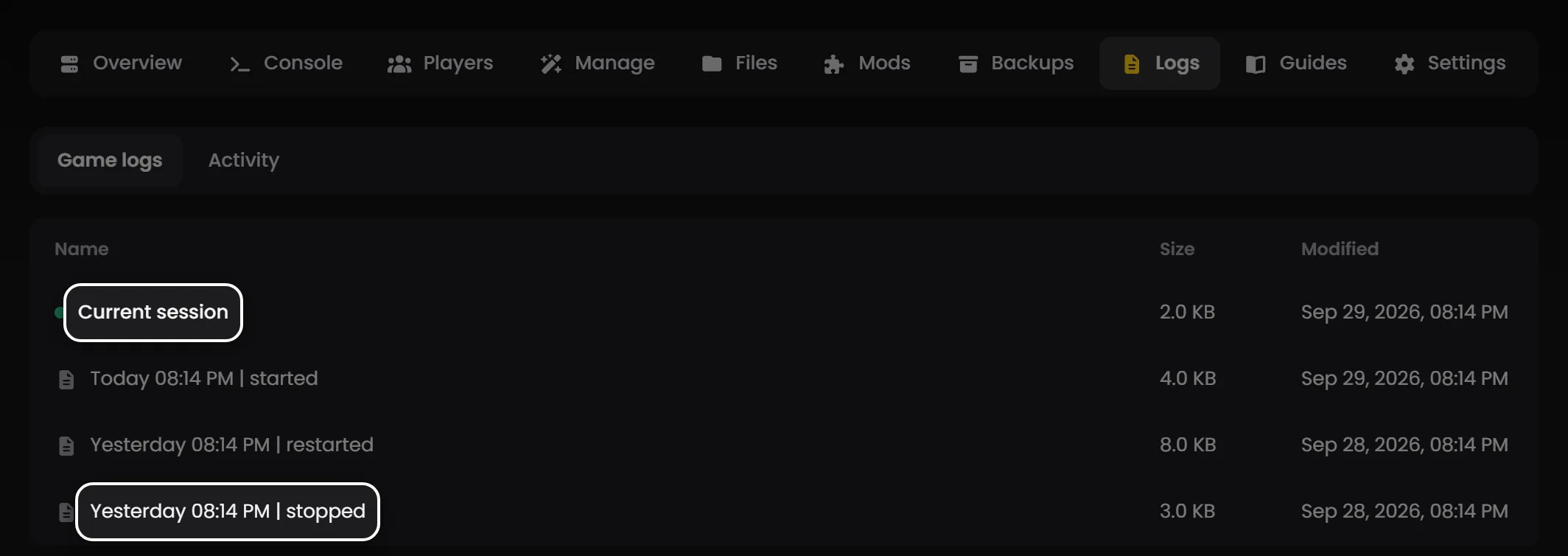
Tip: On LOW.MS you can see exactly which kind of join you got. Open the Logs tab on your server, open the current session, and look for MapUniqueNetIdSteamWithEOS just after your join (the next section explains what it means). If it's there, the server knows who you are. If you've rejoined a few times and keep coming back fresh, open a ticket from the control panel with the times you joined and we'll go through each one.
Why StarRupture gives you a fresh character
A StarRupture server knows each player by two IDs. When you connect you log in with an Epic Online Services (EOS) account, which the game sets up behind the scenes and links to your Steam account. A moment after you've joined, the game client is supposed to send your Steam ID as well, and the server switches you over to it. Your character, inventory and levels are saved against that Steam ID. That second step is the fragile one.
On a good join the server log shows it within about a second:
LogNet: Join succeeded: YourName
LogTemp: Warning: MapUniqueNetIdSteamWithEOS called for PlayerId: 7656119xxxxxxxxxx, Type: STEAM
Leave after a join like that and the log records you leaving under your Steam ID, and the next autosave writes your character out with it.
On a bad join that second line never arrives. You stay on your EOS ID for the whole session, the server has no character stored for that ID, so it makes you a new one. Nothing is wrong with the save. When you leave, it's the EOS ID that gets written down:
LogNet: Join succeeded: YourName
LogTemp: Warning: UnregisterPlayers called for PlayerId: |0002xxxxxxxxxxxxxxxxxxxxxxxxxxxx, Type: EOS
We traced this through one customer's server log, join by join, with no restart and no file changes in between. A join that sent the Steam ID brought their character back, still holding the weapon they'd left with. They dropped some ore, quit, rejoined a couple of minutes later, the Steam ID never came through, and they were fresh again. Same server, same world, same save. That's why I'm confident it's the game client and not anything in the server's settings.
Why the client sometimes skips it, I honestly can't tell you. Quick rejoins seemed to fail more often than slow ones, but we've also watched it fail after a four hour gap, so I wouldn't read much into the timing. Relaunching from Steam is the thing most likely to help, not a guaranteed fix.
Is it this, or has my world reset?
Check this first. The fixes are completely different.
- Only your character is new. The base, the machines and your explored map are all still there. That's this bug, so follow the steps above.
- Everything is gone, base included, and you're on a fresh planet. That's the server loading the wrong world or making a new one at start-up, which is a save problem rather than a character one. It's usually the session name not matching your save folder, or
StartNewGameleft ontrueinDSSettings.txt, and Managing StarRupture server saves and the DSSettings.txt guide cover it properly. - Every single player is new, not just you: look at the world first. A save that didn't load gives everyone a fresh start and looks exactly like a mass character wipe.
The customer we traced had both at once. Their world wasn't loading at start-up because the session name pointed at a folder that didn't exist, and once that was sorted the character resets carried on regardless. So if you've fixed a world problem and you're still spawning fresh, it's probably this as well.
Why restoring a backup makes it worse
Restoring feels like the safe move. Here, it isn't.
A backup rolls the whole world back for everyone, so you lose whatever got built since it was taken, and it doesn't fix anything because the save was never what went wrong. Worse, a backup taken before your last good session doesn't have your latest character in it. It'll have an older one, or none at all.
Editing the .met file is the other one we see a lot. It's normal for it to say SinglePlayer again after you leave, so flipping it to dedicated achieves nothing (the game just writes it back). Leave both files alone.
I'd still take a manual backup before any big game update, mind. That's a separate habit, and a good one.
If you keep spawning as a new character
You've rejoined several times and it never comes back. Write down the exact time of each join and open a ticket, or check the server log yourself for MapUniqueNetIdSteamWithEOS after each one. If none of your joins sent the Steam ID, it's the client every time, and I'd restart Steam itself (or the whole PC) before the next attempt.
You played a whole session on the fresh character. From the logs, that session was saved under your EOS ID rather than your Steam one, so your real character shouldn't have been touched. We haven't proven that end to end, though, which is why step 1 says to leave quickly rather than find out.
A friend gets it and you don't. Same bug, same steps. Every join is separate, so one person's Steam ID getting through says nothing about the next player's.
It only started after a game update. Make sure your game and the server are on the same build. A mismatch normally stops you joining at all, but restart both after a patch anyway.
Reporting it to Creepy Jar
This one's down to the game, so the developers are the people who can fix it. Creepy Jar's Known Issues and EA Roadmap page has a bug report form at the bottom. Pick the multiplayer issue type and give them your game build (it's in the top left corner of the screen), the time you joined, and whether you got your own character or a new one. If you can paste in the two log lines from earlier, even better.
Players have been reporting the same thing on the StarRupture Steam discussions since launch, mostly from co-op sessions where only the host kept their progress, and nothing in the patch notes up to Hotfix 0.3.5 mentions a fix. More reports with log detail can only help.
For anything else that's misbehaving, the StarRupture troubleshooting guide covers the rest, and if your factory still needs a home, have a look at StarRupture server hosting with us.