Most Conan Exiles server problems come down to one of five things: the wrong address, a mod that doesn't match (or doesn't work on Enhanced yet), a game update the server hasn't pulled, a config edit that broke something, or a base that's grown big enough to drag the whole server down. This guide goes through them by symptom, roughly in the order they turn up in our tickets. If you're brand new, the Getting Started and Server Settings guides are a better place to start.
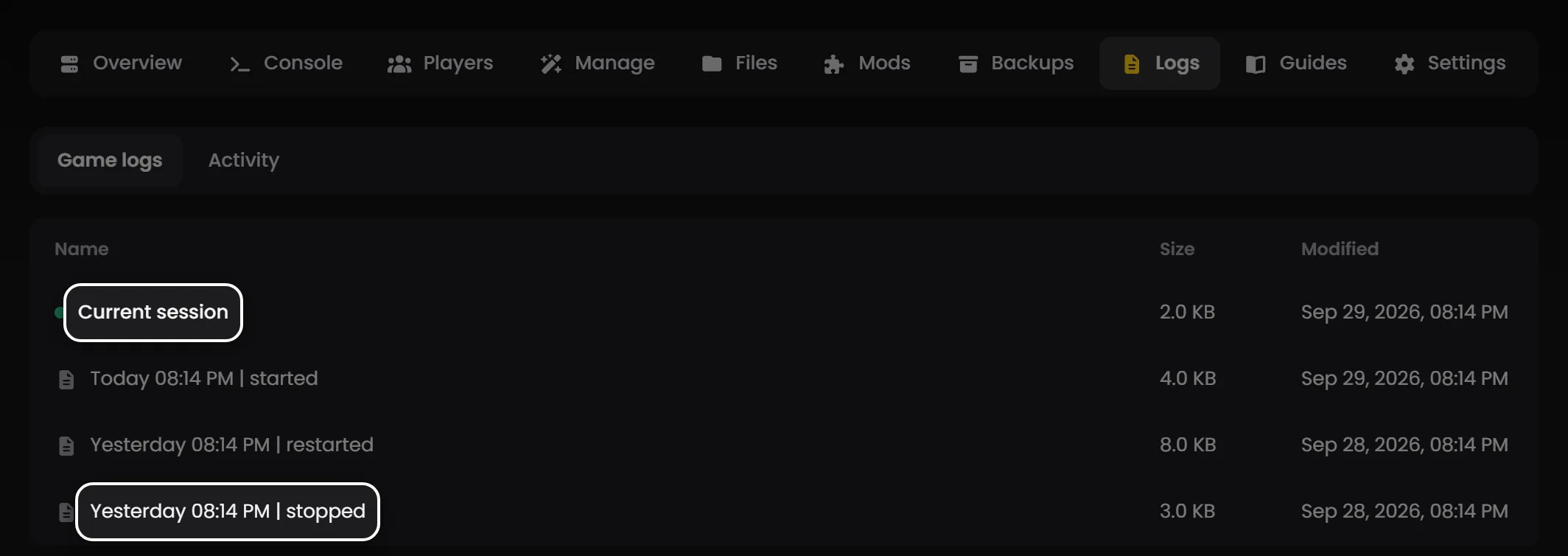
Whatever the symptom, read the server log first. Conan is actually pretty decent at saying why it died, and the answer is usually sat near the end of the last session in plain English.
Tip: On LOW.MS, every session's log is on your server's Logs tab, which is the first stop for almost everything below. Mods go in through the Mods tab, which pulls them from the Workshop and writes modlist.txt for you. Server name, password, slots and tick rate live on the Manage tab, and Engine.ini and Game.ini are rebuilt from it every time the server starts, so hand edits to those two files won't survive a restart. ServerSettings.ini is the one you edit yourself, in the Files tab. If you get stuck, open a ticket from the control panel, we're around 24/7.
Can't connect to the server
This is the number one ticket we get, and 95% of the time it's one of a handful of things. Work through them in order.
- Is the server actually running, and finished loading? Conan takes a while to load the world and open its ports, longer on a modded server. Connect too early and you get a timeout that has nothing to do with your setup. Give it a minute.
- Are you using the right address? Use the server's game address and port in the in-game Direct Connect box. Conan also opens a query port, and it won't let you in on that one. We get tickets every week where the fix is literally "you typed the query port".
- Is it in the in-game browser yet? Freshly started servers don't always show up straight away. Use Direct Connect in the meantime, or add the server to your Steam favourites (View, Game Servers, Favorites) and it'll turn up reliably there.
- Is the name doing something weird? Really long server names, or ones packed with special characters, sometimes get dropped from the browser entirely. If nobody can find it by name but Direct Connect works, shorten the name and restart.
"Pending Connection Failure"
Annoying, because the message is basically useless. It just means the client got as far as the handshake and then bounced. Any of these can cause it:
- A mod version mismatch. The most common cause on a server that's been running a while. The server updated its mods and the player hasn't, or the other way round. See the mod mismatch section below.
- Game version drift. Funcom pushed a patch, your client already has it, and the server hasn't updated yet (or the reverse). Update the server and restart it.
- Stale build-ID lines after the UE4 to UE5 upgrade. Inflexion's troubleshooting page says old servers can carry
bUseBuildIdOverrideandBuildIdOverridelines inEngine.inithat make the server think it's on a different version from its clients. Delete both lines and restart. Hotfix 1.0.3 (May 13) says upgraded servers no longer need config edits for this, so it mostly bites servers that were upgraded in the first week. - A full server. Obvious, but worth checking.
- BattlEye not installed properly on the client. See the BattlEye section.
Server won't start or keeps crashing
Read the end of the last session's log. Then match it to one of these:
- A broken mod. If it started crashing the moment you added a mod, that's your culprit. Remove the last one you added and try again. We've written up the modded server crash on startup case separately because it's that common.
- A Conan update the server hasn't pulled. Update the server, then start it.
- A
ServerSettings.iniyou've edited by hand and broken. A missing=, a stray character, a key pasted under the wrong section. Revert your last change and see if it boots. - A bad database. Rare, but it happens, usually after an unclean shutdown. Restore the last backup from before it went wrong (see the backups section) and you'll be back in business.
- A bumpy Enhanced upgrade. If the server only stopped booting cleanly after the UE5 update, the install itself can be inconsistent. The Enhanced update guide covers the recovery path.
If the log reads like gibberish, grab the last 50 lines, paste them into a ticket, and we'll take a look.
Mods are being a nightmare
Mods are the single biggest source of Conan server pain. We see a lot of this, and it's nearly always one of three things.
Mods aren't loading
- Every mod you want loaded has to be in
modlist.txt, which the server reads once, at startup. Changed your mods? Restart the server. Live edits do nothing. - Big mods can be several hundred megabytes. If you've just added one, give the server time to pull it from the Workshop before you decide it's broken.
- Old UE4 (Legacy) mods don't load on Enhanced. Since hotfix 1.0.1 the game skips them quietly rather than choking on them, so a mod that "isn't loading" may simply never have been updated for Enhanced. Check its Workshop page.
"Mod mismatch" when players join
Every player needs the same mods as the server, at the same versions. When they don't, Conan shows a mod mismatch screen listing what's missing or out of date, with an option to subscribe to and update everything in one go. That fixes most cases on its own.
For a bigger mod list, bundle your mods as a Steam Workshop Collection and hand out the link, so players can subscribe to the lot in one click. If one specific player is stuck in a mismatch loop while everyone else is fine, get them to unsubscribe from everything, restart Steam, and re-subscribe from your collection. Nine times out of ten that clears it.
If a single mod keeps causing the mismatch and it hasn't been updated since the Enhanced launch in May 2026, it may just not be UE5-ready. Dropping it from the list is the cleanest fix until the author ships an update.
Mods cause crashes
Just added a mod and now the server crashes? It's that mod. Remove it, restart, done.
With a bigger stack and no idea which one's at fault, disable mods in batches. Halve the list, see if it boots, then halve whichever half broke it. Bisecting beats pulling them out one at a time, especially past ten mods.
A small warning: there's no "official" load order rule for Conan mods. You'll see forum posts swearing by this order or that one. Ignore them unless the specific mod's own Workshop page says it needs to load before or after something else. Most of the time the authors have sorted dependencies out already, and reordering your list makes things worse, not better.
Performance issues: lag, rubber-banding, low server FPS
Look at memory and CPU first. If the server is pinned, you've found your answer: either something is eating resources it shouldn't (usually a mod), or you've outgrown your plan and a bigger Conan Exiles server would help.
Enhanced is heavier than the old UE4 build was, so a server that felt fine on Legacy can struggle after the upgrade without anything being "wrong". Funcom's Update 2.2.0 (September 15) moved the server to Epic's Iris networking specifically to cut the cost of lots of players and placeables, so if you're on an older build, updating is the first thing to try.
Assuming resources look okay, the usual suspects, roughly in order of how often they're the cause:
- Building piece counts. Huge bases with thousands of placed pieces are the single biggest cause of Conan lag. Every piece is tracked and synced, and one player's mountain fortress can tank the server for everyone.
- Abandoned bases. Make sure building abandonment is switched on (
DisableBuildingAbandonment=FalseinServerSettings.ini) so the game cleans up after players who've left. It makes a real difference over the life of a server. - Purges. An active purge spawns a pile of NPCs and runs a lot of pathfinding. A dip during a purge is mostly normal. Just don't schedule them for peak hours if you can help it.
- Mods that add NPCs or building pieces. AI overhauls and "more buildables" mods are lovely but expensive. Installed one and performance fell off a cliff? There you go.
- Player count near your slot limit. Every server has a sweet spot well below its ceiling. If you're running near the top and it feels bad, it probably is.
The free first-line fix for any lag complaint: a daily restart. Conan's memory use creeps up the longer it runs, and a fresh start works wonders. Schedule it for a quiet hour and forget about it.
BattlEye issues
BattlEye is Conan's anti-cheat, and it has a reputation.
Turning BattlEye off (private server)
It's the IsBattlEyeEnabled line in ServerSettings.ini. Stop the server first, because the game writes to that file while it runs, then set it to False, save, and start it again. Lovely for small private groups where you know everyone, since nobody needs BattlEye's client install working to get in. Want it back? Same line, True.
BattlEye failing on a player's PC
This is a client-side problem, and there's nothing the server can do about it directly. Get the affected player to:
- Restart Steam and Conan fully.
- Right-click Conan in Steam, then Properties, Installed Files, Verify integrity of game files. That reinstalls BattlEye on the client if it's gone missing.
- Run Steam as administrator. Yes, really. It sometimes matters for BattlEye.
- Turn off anything that injects an overlay: Discord, MSI Afterburner, RivaTuner, the lot. BattlEye is twitchy about overlays and occasionally refuses to start if one misbehaves.
If the player can't launch the game at all, that's a different problem: the Enhanced won't launch guide covers it.
BattlEye broken on the server itself
If the server log says BattlEye failed to load on the server side, raise a ticket and we'll sort it. Not something you need to fight with by hand.
Game updates and version issues
When Funcom pushes a patch, the server has to pull it before anyone on the new client can join. Update the server, and it'll stop, update and start again.
A couple of gotchas:
- Mods often break the moment the base game updates. Give it a day and most popular mods catch up. Check each mod's Workshop page if you're in a hurry.
- Funcom occasionally renames config keys or adds sections, and an old
ServerSettings.inican end up half-overwritten. Keep a copy of yours (see below) so you can compare after a big patch. - The UE4 to UE5 jump is a special case. Steam's incremental update can leave the install inconsistent, and the symptom is usually a server that won't boot with no useful log. The Enhanced update guide walks through recovering from it. If you want to stay on UE4 for now, see keeping your server on Legacy.
Backups, lost progress, "my world reset"
Before you panic: if you've been taking backups, you almost certainly haven't lost everything. To roll back:
- Stop the server.
- Pick the most recent backup taken before the thing went wrong.
- Restore it.
- Start the server again.
A restore rolls back everyone, not just the person who lost something. A few specific situations:
- "A player lost their inventory." Usually either a crash between auto-saves (anything picked up in that window is gone, that's how Conan works), or a mod got removed and took its items with it. Removing a mod always deletes every item it added, from every inventory. Expected, not a bug.
- "A player lost their character entirely." Much rarer. Usually a failed character transfer between servers. If there's no backup from before the transfer, the character can't come back. Funcom's system leaves nothing for anyone to pull it back from.
- "The whole world has reset." Almost always means the server booted with a broken save and started fresh. Stop it immediately (don't let it keep writing over the new empty save!) and restore. The faster you catch it, the more you keep.
One habit worth forming: after any config change you're proud of, download a copy of ServerSettings.ini and stash it somewhere safe. Ten seconds now, hours saved the day an update scrambles your settings.
If none of this helps
We'd rather hear from you sooner than later. There's no prize for bouncing off a problem for two hours before opening a ticket. Raise one from the control panel and include:
- What you were doing when it broke.
- The last 30-50 lines of the log.
- Your mods, and whether you recently added or changed one.
- Whether it's hitting everyone or just one player.
With that in hand we can usually get you running again quickly. And if it turns out to be something on our side, a node hiccup or a network blip, we'll sort it and tell you what happened.