To wipe a Rust server, stop it, open its identity folder (server/<identity>/, where everything the world needs is kept) and delete the map and save files, then start it again with a new seed if you want a new map. Add the blueprint database for a blueprint wipe, or every database in the folder for a full wipe. That's the whole job, really. The files aren't the hard part. What catches people out is everything around it: the save files Rust rotates and keeps, the plugin data that quietly survives the wipe, and the server that writes the old world straight back because it was still running when the files went.
How to wipe a Rust server
- Pick the kind of wipe. A map wipe clears the world and keeps learned blueprints, a blueprint wipe clears blueprints and keeps the map, and a full wipe clears both along with all player data.
- Update first on force wipe day. Facepunch's monthly update lands on the first Thursday of the month, and its default wipe timer points at 19:00 London time. Update it as part of the wipe, so it comes back up on the new build.
- Stop the server properly. Use
quitor your host's Stop button. Then wait until it's fully down. - Back up the identity folder. Copy all of
server/<identity>/somewhere safe, so a wrong delete can be put back. - Delete the map files. That's every
.map, every.savfile and its numbered copies (.sav.1,.sav.2), the_occlusion_.datfiles, the.navmeshfiles, and thesv.filesandplayer.deathsdatabases. - For a blueprint wipe, delete
player.blueprints.*.db. Leave the map files alone if the map should stay. - For a full wipe, delete every
.dbfile in the folder. That takes player identities, clans and Rust+ pairings with it. Leavecompanion.idwhere it is. - Clear the plugin data that belongs to the old wipe. Clans, kit cooldowns and backpacks live in
oxide/data(orcarbon/dataon Carbon), and none of it is touched by deleting the save files. - Set a new seed if you want a new map, then start the server. Change
server.seed(andserver.worldsize, if the size should change too) before it boots.
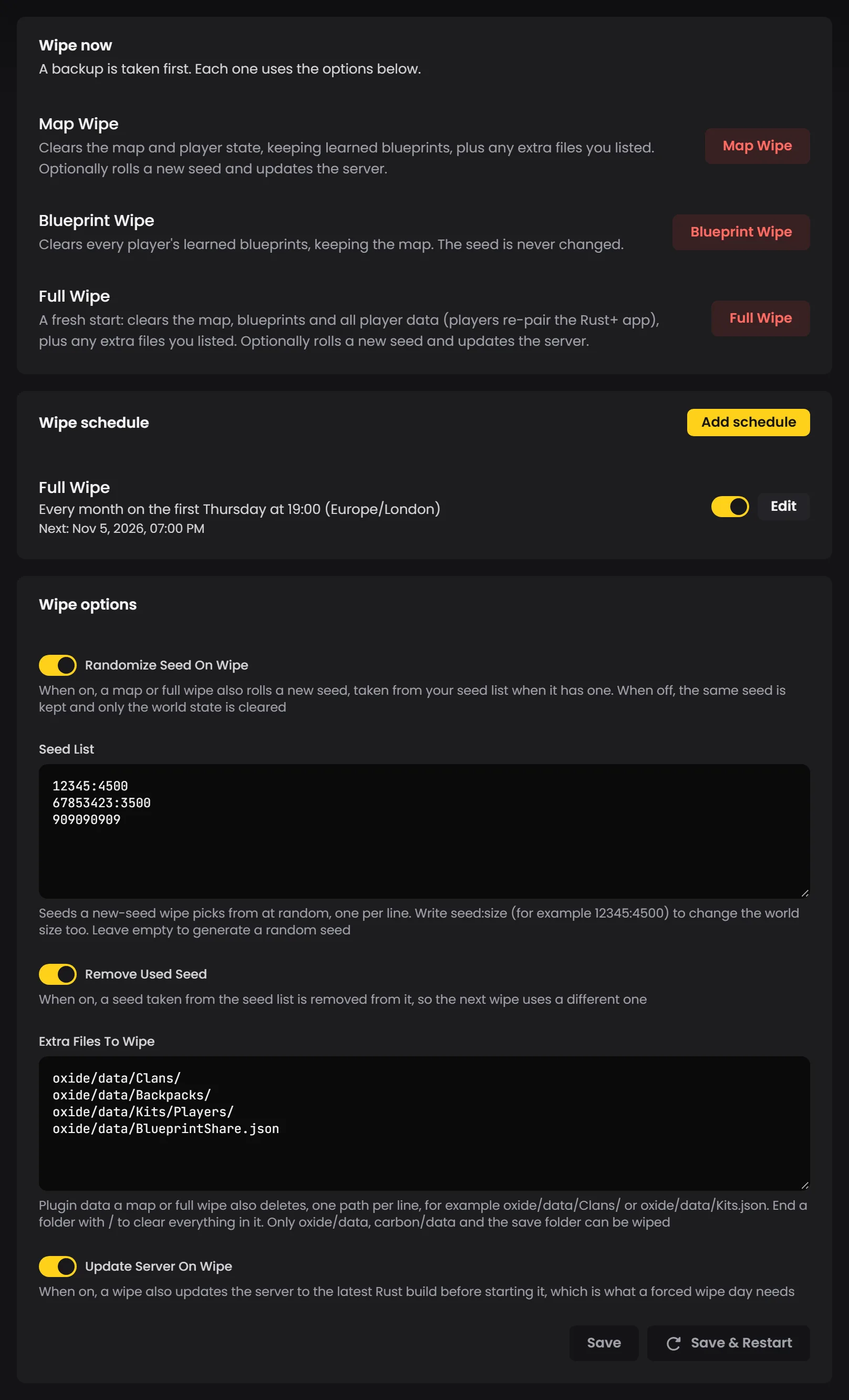
Tip: On LOW.MS, all of this runs from the Wipe section of your server's Manage tab in the control panel. Each wipe stops the server and takes a backup before it deletes anything, you can list the plugin files it should clear and the seeds it should rotate through, and a schedule can run it on the first Thursday for you. The full walkthrough is in the Guides tab of your server.
Map wipe, blueprint wipe or full wipe: what each one deletes
The three wipes aren't really three different operations. They're three different sets of files, and once you can see them side by side it's much easier to be sure you've deleted the right ones.
Files in server/<identity>/ |
Map wipe | Blueprint wipe | Full wipe |
|---|---|---|---|
.map, .sav and its copies, _occlusion_ .dat, .navmesh |
Deleted | Kept | Deleted |
sv.files.*.db, player.deaths.*.db |
Deleted | Kept | Deleted |
player.blueprints.*.db |
Kept | Deleted | Deleted |
Every other .db (identities, states, relationships, clans, Rust+ tokens) |
Kept | Kept | Deleted |
companion.id, cfg/ |
Kept | Kept | Kept |
A map wipe is what most community servers mean by "wipe": a new world, but players still know how to craft what they'd learned. The blueprint wipe on its own is the odd one out. Honestly, I'd only reach for it if your players are asking for a progression reset without losing their bases. The full wipe is the fresh start, and it's the one that sends people to the Rust+ app wondering why their server's gone (more on that below).
Where are Rust server save files?
Everything lives in the identity folder, server/<identity>/ inside the Rust install. The identity is whatever +server.identity is set to on the command line; Facepunch's own example uses server1, and a lot of servers just use main. Your server.cfg sits in its cfg folder, which you don't want to delete, so be a bit careful with a select-all. It's easy to take the config out with the saves.
A few things in there are worth knowing before you start deleting:
- The save is more than one file. Rust keeps a couple of older saves beside the current one, numbered
.sav.1and.sav.2. Delete.savalone and those copies of the old world stay behind, which is why step 5 says "and its numbered copies". - Database files can have companions. If you see a
-walor-journalfile next to a.db, it belongs to that database and goes with it. Leave one behind and it can be read back into the fresh database on the next start. - Navmesh files pile up. The server writes one per map and doesn't clear out the old ones. On one server we looked at, four dead seeds' worth came to about 300 MB, all of it copied into every backup.
- Never delete
companion.id. It's your server's identity to the Rust+ app, and Facepunch is blunt about it: delete it and a brand new identity is generated, with "no getting it back once it's gone", and every player has to pair again. A full wipe takes the databases, not this file. - The numbers in the file names are versions.
player.states.289.dbandplayer.blueprints.18.dbsitting side by side is normal. Match the name, not the number.
If you're moving a world rather than wiping one, our Rust save location guide covers uploading a save to a server instead.
Why a running server undoes your wipe
This is the one we see most. Somebody deletes the map files while the server's still up, restarts it, and the old world is back exactly as it was. The server has the whole world in memory, so when it shuts down it saves, and that save is the world you just deleted. It also saves on a timer while it runs. Waiting doesn't help.
So the order matters. Stop first, wait for it to be fully down, then delete. That's step 3, and it's why it comes before the backup and the deletes rather than after.
Choosing a seed and world size
Facepunch's server docs give the seed as any value from 0 to 2147483647 and the world size as 1000 to 6000. Keep the seed and size and you should get the same map back, which is handy if your players have a favourite (a big game update can still move things around). But a new seed is what makes a wipe feel like a wipe. Most servers change it every time.
If you rotate seeds, keep a list of ones you've checked rather than rolling blind. A random seed can put half the monuments in the sea or leave you with one giant snow biome, and I'd much rather find that out on a map preview site than an hour after launch with sixty people online. Pair each seed with the size you checked it at, because the same seed at a different size is a different map.
Bigger isn't automatically better either. A 6000 map with twenty players feels empty. It also takes longer to generate, and I'd rather players were in on the first night than waiting. Most community servers sit somewhere between 3000 and 4500, and our Rust server settings guide goes into the rest of the world settings.
Wiping Oxide and Carbon plugin data
Deleting the save files resets the world and leaves your plugins exactly as they were. Oxide keeps plugin data in oxide/data, Carbon in carbon/data, and plenty of what's in there is tied to a wipe: clan memberships, kit cooldowns, backpack contents, shop balances, stats. Leave it and a fresh map opens with last wipe's clans already formed, which players will notice within about five minutes.
Clear the per-wipe data and leave the rest. Don't empty oxide/data wholesale: Oxide keeps its own permission groups and user permissions in there, and losing those means rebuilding every admin and VIP group by hand. Each plugin's page on uMod usually says which data file it writes, and if you're not sure what a plugin keeps, check before the wipe, not during it. Our top Rust Oxide plugins list is a decent place to start if you're choosing which ones to run.
Telling the game when you wipe
Rust has a wipe timer built in. Most people never notice it. It's the countdown on the laptop at the bottom of the Missile Silo, and it isn't decoration: 24 hours before it runs out, the server starts its endgame events, with F-15 flyovers and Bradleys roaming the roads. By default it assumes the first Thursday of the month at 19:00 London time (or every Thursday, or two Thursdays a month, depending on your server's wipe tag).
Wipe on a different day? Change it to match. The wipetimer.wipeDayofWeek, wipetimer.wipeHourofDay and wipetimer.wipeTimezone ConVars cover a regular schedule, and wipetimer.wipecronoverride handles anything odder, like a three-day cycle. Otherwise the endgame starts on a day that means nothing on your server.
Rust wipe troubleshooting
The old world came back after the wipe. The server was running when the files were deleted, so it saved the world back on shutdown. Stop it, delete the files again, then start it.
Players still have their blueprints after a full wipe. player.blueprints.*.db wasn't deleted. Easy miss. A map wipe keeps blueprints on purpose; a full wipe should take them too.
The new map is the same as the old one. Same seed, same map. Deleting the map files regenerates the same world from the same seed, so set a new server.seed before you start.
Rust+ stopped working for everyone. A full wipe deletes the Rust+ tokens along with every other database. Players pair the app with the server again from the in-game menu, the same way they did the first time.
Clans and kits carried over to the new wipe. That's plugin data in oxide/data or carbon/data, which the save files don't include. Clear those files while the server is stopped.
The disk keeps filling up after every wipe. Old .navmesh files and numbered .sav copies left behind from earlier maps. Delete the ones for seeds you're no longer running.
If you're planning around Facepunch's dates rather than your own, our Rust wipe schedule for 2026 lists every force wipe for the year. And if you'd rather the wipes ran themselves, with a backup taken first every time, that's all built into our Rust server hosting.