If you've run an Arma Reforger server with us before, you'll know the drill: open config.json, find the right block, paste a mod object in without breaking a comma, save, restart, and hope the server comes back. It worked, but it wasn't anyone's favourite part of the evening.
Reforger servers now run on the new LOW.MS control panel at panel.low.ms, and almost all of that is gone. Here's what's changed, with mods first because that's what most of you will care about.
How it works
If you just want the short version, this is how you set up a Reforger server on the new panel:
- Log in at panel.low.ms and open your Reforger server.
- On the Mods tab, use Browse to search the Workshop and install mods, or choose Add mod by id to paste ids or Workshop links you already have.
- On the Manage tab, pick your mission under Scenario and adjust settings such as server name, password and player slots.
- Press Save, then restart.
- When the server starts, it downloads every mod along with its dependencies, and the panel rebuilds the config file from your settings and your server's own ports.
The sections below go through each part in more detail.
Mods, without editing JSON
Reforger mods don't come from the Steam Workshop. Bohemia runs its own Reforger Workshop, the same one PC, Xbox and PlayStation players download from, and the server fetches every mod itself when it starts. So the panel works with Workshop mods directly.
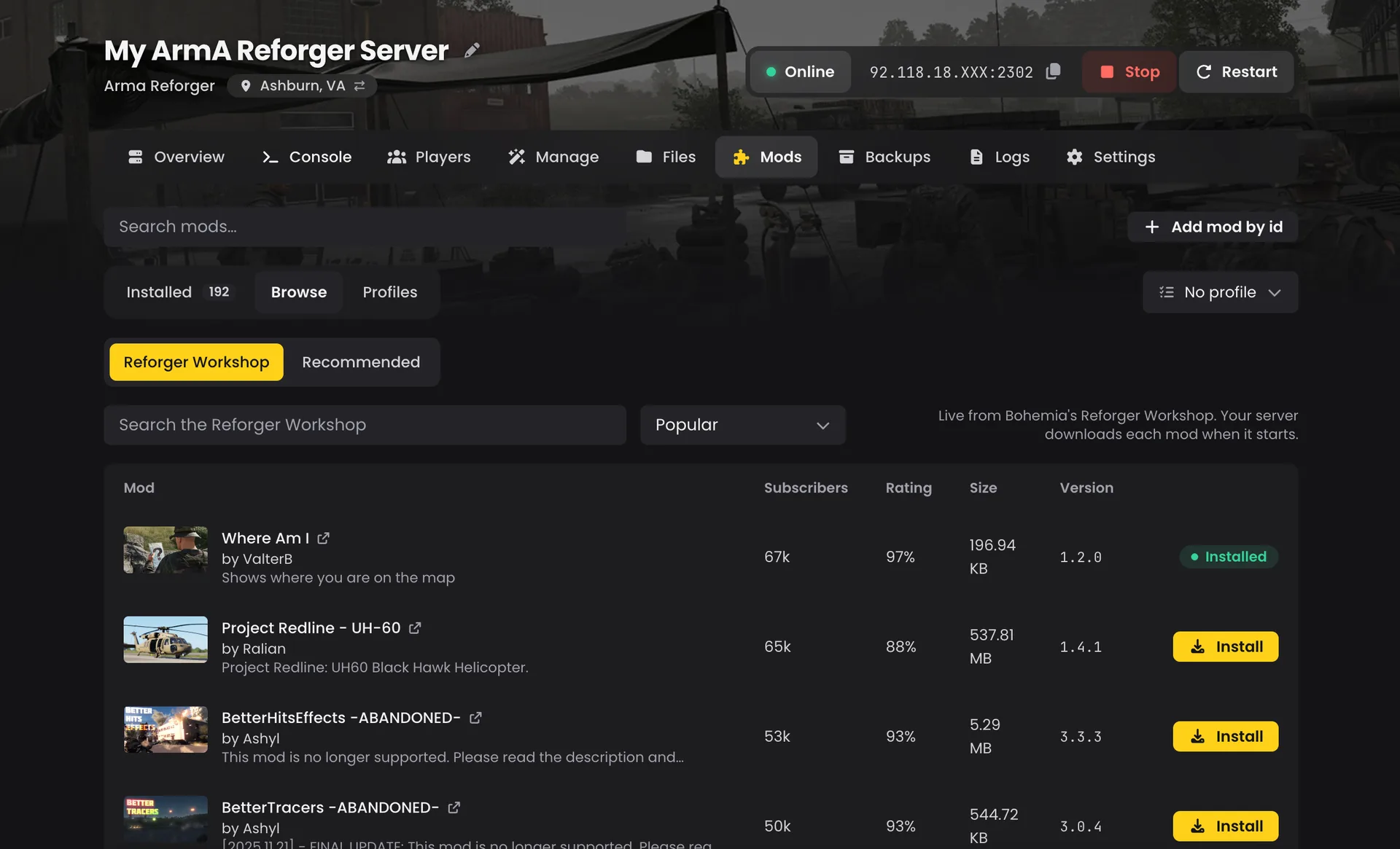
Search the Workshop from the Mods tab. Open Browse, type what you're after and install it in one click. Each result shows its preview, author, subscribers, rating, size and current version. You can hold a mod at the version you installed, or leave it to update itself whenever the server restarts.
Or add it by id. Already have a list from another host? On the Mods tab, choose Add mod by id and paste the 16-character id or the mod's Workshop link. The name fills in from the link, and the mod lands on your Installed list.
Dependencies are the game's job. When the server starts, it downloads each mod along with everything that mod needs, so you never have to add dependencies by hand or fuss over load order.
We'll warn you about broken mods before they break your server. This one comes from experience. When a mod's author removes something it depends on, Bohemia refuses the whole mod list and the server won't start, even if the rest of your 200 mods are fine. When you install from the Workshop search, we check every dependency first, and if one has gone we name it before you press Install.
Scenarios in one click
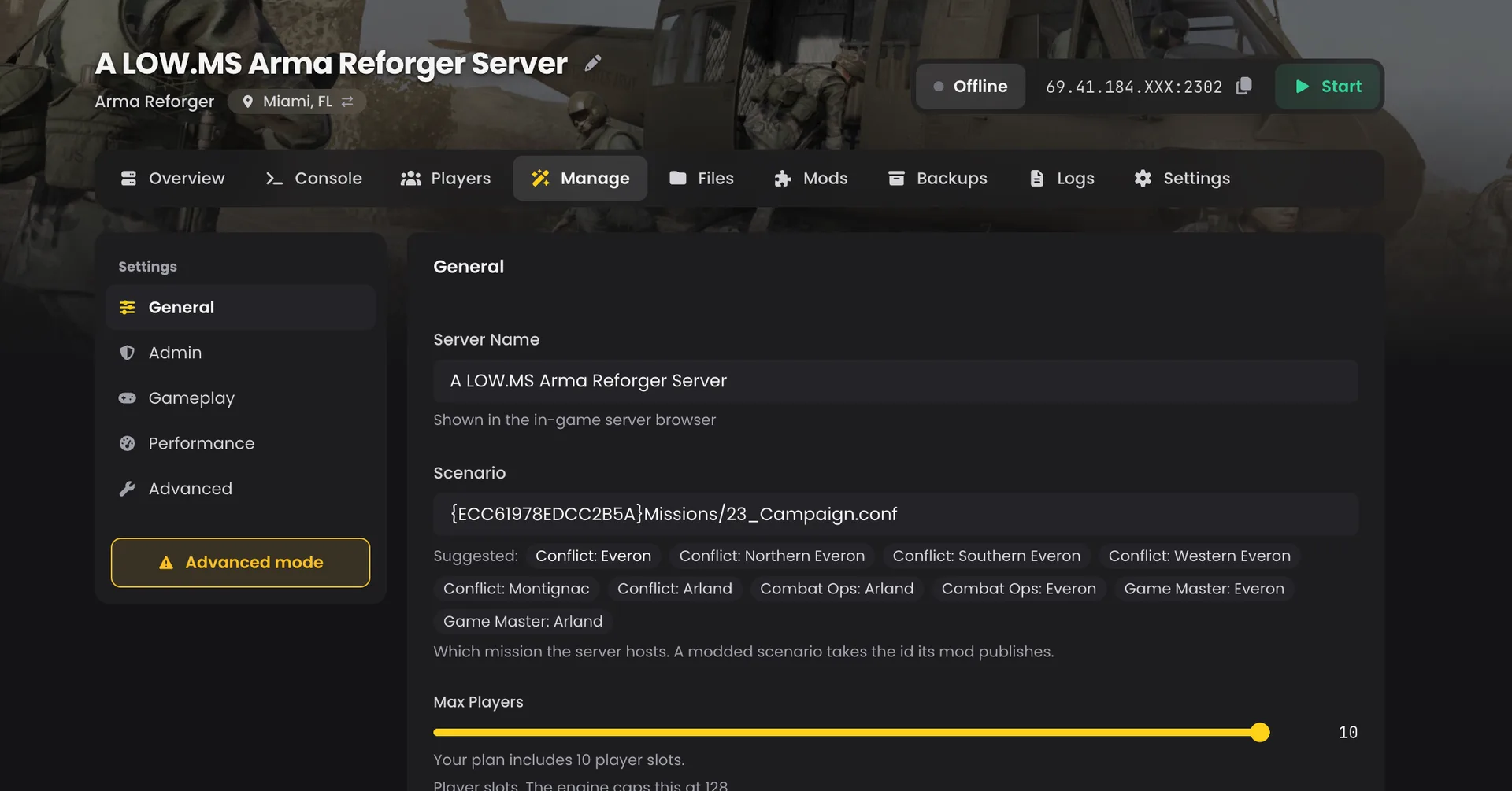
Open the Manage tab and pick a mission under Scenario: Conflict on Everon, Northern, Southern or Western Everon, Montignac or Arland, Combat Ops on Arland or Everon, or Game Master on Everon or Arland. Running a modded scenario instead? Paste the id its mod publishes into the same field and restart.
Turn on Resume Last Session if you want a restart to carry on from the last save rather than starting the mission fresh. Handy for a long Conflict campaign.
Every setting, on one page
Everything that used to live in config.json is now a labelled setting on the Manage tab: server name, password, player slots, browser visibility, first-person only, cross-faction voice, view and network distances, grass, AI limit, player save interval, slot reservation and a join queue. Change one, press Save, restart.
The panel rebuilds the config file on every start from those settings and your server's own ports, so a missing comma can't take the server down any more. If you really do need a key we don't expose, Advanced mode on the Manage tab lets you take the file over and edit it by hand.
Admins and RCON
Every server gets its own admin password, shown on the Manage tab with a copy button. Type #login and that password in chat to kick, ban and run Game Master. Want certain players to be admin without typing anything? Add their Bohemia identity id or SteamID64 to Admins, one per line.
For BattleMetrics, Discord bots and RCON-driven mods, switch on External RCON access on the Settings tab and restart. The port and a password generated just for your server then show on the RCON tab of your Overview page. RCON is off by default, so the port stays closed until you want it.
Crossplay and BattlEye
Crossplay is on by default, so PC, Xbox and PlayStation 5 players can all join. Console players can only join servers running BattlEye, so the one Crossplay switch handles both. Turn it off for a PC-only server.
One thing worth knowing if you run a modded crossplay server: Sony blocks any mod that contains script code on PS5. PlayStation players can still use mods that add content like maps, vehicles and weapons, but a pack with script mods in it will keep them out.
The rest of the panel
You also get everything the new panel does for every game:
- A live console you can watch while the mission loads, plus logs from earlier starts.
- Backups of your session saves and BattlEye data, which you can restore whenever you like.
- Scheduled tasks for daily restarts.
- A Files tab, plus SFTP for anything big.
- Your address and the Direct Join steps on the Overview page.
Already with us? We're moving you across
If your Reforger server is on our old panel, we're moving it to the new one, and you don't need to do anything. Your server keeps its IP and game port, so players join exactly as before. Your mod list, scenario, passwords, admins, saves and RCON settings all come with it, and your mods show up on the Installed list ready to manage.
The one thing that changes is the query port, which is now your game port plus one. If you list the server on BattleMetrics or a similar site, update the port there after the move.
FAQ
Do I need to do anything to move to the new panel? No. We're moving existing Reforger servers across for you, and your mod list, scenario, passwords, admins, saves and RCON settings all come with it.
Will my players need a new address? No. Your server keeps its IP and game port. Only the query port changes (it is now your game port plus one), so update it on BattleMetrics or similar sites if you list your server there.
Do I have to add mod dependencies myself? No. The server downloads each mod along with everything it needs when it starts, so you don't need to add dependencies or manage load order.
Can I still edit config.json by hand?
Yes. Turn on Advanced mode on the Manage tab to take the file over and edit it yourself.
Is RCON open on my server? Not unless you turn it on. Switch on External RCON access on the Settings tab and restart, then find the port and password on the RCON tab of your Overview page.
Can PlayStation 5 players use my mods? They can use mods that add content like maps, vehicles and weapons. Sony blocks any mod that contains script code on PS5, so a pack with script mods in it will keep PlayStation players out.
Get started
New to Reforger hosting? Pick a plan on our Arma Reforger server hosting page. Every plan starts at 10 GB of RAM and runs up to the game's full 128 slots. If you get stuck anywhere, open a ticket and a real person will sort it out.