$8.95/mo
$1.12 za slot (8)
- Natychmiastowa konfiguracja, online w kilka sekund
- Ochrona DDoS w cenie
Jak dołączyć z PlayStation
Przeniesienie Twojej ekipy z PlayStation na serwer Palworld zajmuje kilka minut.
- 1
Zamów serwer
Wybierz plan i lokalizację najbliżej Twoich graczy. Serwer Palworld zostanie skonfigurowany automatycznie po płatności.
- 2
Skonfiguruj po swojemu
Zmieniaj ustawienia serwera, takie jak nazwa i hasło, jeśli gra je oferuje, w dowolnej przeglądarce, także na telefonie.
- 3
Udostępnij dane do połączenia
Panel pokazuje adres serwera i dane do połączenia. Wyślij je znajomym, z którymi chcesz grać.
- 4
Dołącz z PlayStation
Uruchom Palworld na PlayStation i dołącz przez listę serwerów w grze albo sposób dołączania, który gra oferuje na tej platformie.
Gracze na PlayStation dołączają do serwerów dedykowanych z poziomu gry. Jeśli Palworld ma ustawienie crossplay, upewnij się, że jest włączone na Twoim serwerze, zanim połączą się znajomi z PlayStation. Nasz zespół wsparcia pomoże to sprawdzić.
Graj w Palworld na różnych platformach
Palworld jest dostępne także na Steam, PC i Xbox. Jeśli gra obsługuje crossplay między tymi wersjami, ich gracze mogą dołączyć do tego samego serwera co Twoja ekipa z PlayStation.
Dlaczego LOW.MS?
Oto kilka powodów, dla których LOW.MS to idealne miejsce na Twój serwer gry.
Crossplay default-on
Steam, Xbox, PS5, and Mac players all join the same server. No config, no upgrade, no extra plan needed.
Painless host migration
Moving from another Palworld host? We move your world, base, and Pals across for you. Automatic for common hosts, hands-on help for the rest.
Every .ini tweak in the browser
Edit PalWorldSettings.ini for capture rates, XP, damage, and hatching time through Configuration Files. Our docs cover the WorldOption.sav override bug that silently breaks settings.
Generous RAM, no overfilled nodes
Pocketpair recommends 16 GB for a Palworld server. We start at 10 GB, scale to 30 GB, and never stack servers tight on our hardware.
Nexus Mods with the right UE4SS
Drop .pak mods into File Manager. We ship the Palworld-specific RE-UE4SS build, not the generic one that crashes servers post-patch 0.4.1.5.
DDoS protection built in
Palworld servers attract the server-browser crowd hard, so enterprise DDoS protection is standard on every plan, not a paid upgrade.
Rated 4.8 out of 5 on Trustpilot
What people say after they have moved a server to us.
Read our reviews on TrustpilotTop choice in my list
Out of all hosting providers. This is by far the top choice in my list. Simple UI with a mod manager included making it hassle-free when downloading specific mods.
Jose, Trustpilot review
Very helpful and responsive
I opened a ticket for help migrating my server from a different host. The game is Palworld and it isn't a simple process, they did it for me! Very helpful and responsive.
Justin, Trustpilot review
Insanely reliable service
Their prices are pretty cheap and I thought they'd cut back on performance but damn was I wrong. The service has been insanely reliable and the Support Team are on their own level!
Anti, Trustpilot review
13 Lokalizacje serwerów
Niskie opóźnienia, gdziekolwiek są Twoi gracze
Wybierz lokalizację najbliżej swoich graczy Palworld. Jeśli nie wiesz, którą wybrać, skontaktuj się ze wsparciem.
Każda lokalizacja ma ochronę DDoS, która wytrzymuje ataki do 100 Gbps.
Jeśli chcesz, żebyśmy dodali jakąś lokalizację, daj nam znać. Właściwa lokalizacja sprawia też, że serwer pojawia się we właściwym regionie w przeglądarce serwerów w grze.
Nasze centra danychEuropa
- Amsterdam, NL
- Norymberga, DE
- Helsinki, FI
- Warszawa, PL
Ameryka Północna
- Ashburn, VA
- Miami, FL
- Dallas, TX
- San Jose, CA
- Los Angeles, CA
- Bend, OR
Azja i Oceania
- Singapur, SG
- Sydney, AU
- Melbourne, AU
Najczęściej zadawane pytania
Częste pytania o hosting Palworld dla graczy na PlayStation.
Gotowy na własny serwer Palworld?
Natychmiastowa konfiguracja
Twój serwer będzie gotowy w kilka minut
Ochrona DDoS
Ochrona klasy enterprise w cenie
Wsparcie 24/7
Pomoc ekspertów, kiedy tylko jej potrzebujesz
Już od
Anuluj kiedy chcesz. Bez okresu minimalnego. Pełny zwrot w ciągu 5 dni.
Artykuły z bazy wiedzy
Wybór poradników i artykułów o hostingu , napisanych ręcznie przez nasz zespół wsparcia
Connecting to Your Server with SFTP (Port 8822)
Connect FileZilla or WinSCP to your LOW.MS server on port 8822 with your control panel login, find your files, and fix the usual connection and upload problems.
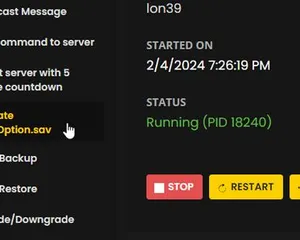
Increasing max pals on your server
We've fixed this issue on our dedicated servers!
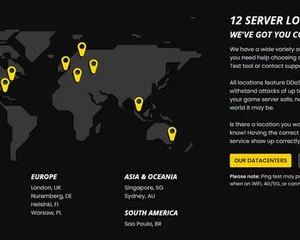
Transfer your Palworld server to a new location
A quick guide on getting your server transferred over to a different region
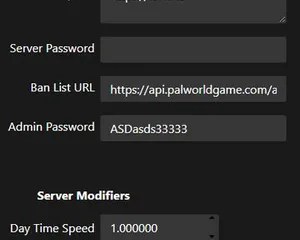
Server configuration for Palworld
Guide for customizing your Palworld server
WorldOption.sav vs PalWorldSettings.ini – Why Your Palworld Settings Won't Apply
If a WorldOption.sav file exists in your save folder, your Palworld server ignores most of PalWorldSettings.ini. Here's how to check which file your server is actually reading, and how to fix settings that revert or never apply.
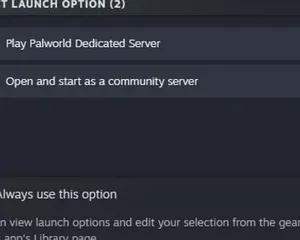
Palworld - Setting up a dedicated Server
Setting up a server via SteamCMD
Nowoczesny panel sterowania
Uruchamiaj, zatrzymuj i zarządzaj serwerem Palworld w przeglądarce. Ustawienia serwera, pliki i kopie zapasowe znajdziesz w panelu sterowania.
Nexus jest już dostępny dla obsługiwanych gier i oferuje wbudowane narzędzia do zarządzania serwerem. Istniejące serwery mogą nadal korzystać z TCAdmin. Nasz zespół pomoże Ci znaleźć odpowiedni panel.
Więcej informacji