If your FiveM or RedM server shows up in the server list as "Missing server data (must be configured in Portal)", the fix isn't in your server files at all: sign in to the Cfx Portal at portal.cfx.re, open the server under Servers, and fill in its name, tagline, description, language and tags there. From 21 October 2026 Cfx.re manages a server's listing details through the Portal instead of reading them out of server.cfg, so the Portal is where the fix goes.
Cfx.re says it copied existing details across where it had them recently, so plenty of servers will carry on looking exactly as they did. The ones it couldn't find data for get that placeholder text instead. That's the version that sends people digging through their config for a setting that won't fill the listing in.
How to fix "Missing server data" in the Cfx Portal
- Sign in to the Cfx Portal at portal.cfx.re with the Cfx.re account that generated your server's registration key (the key in your
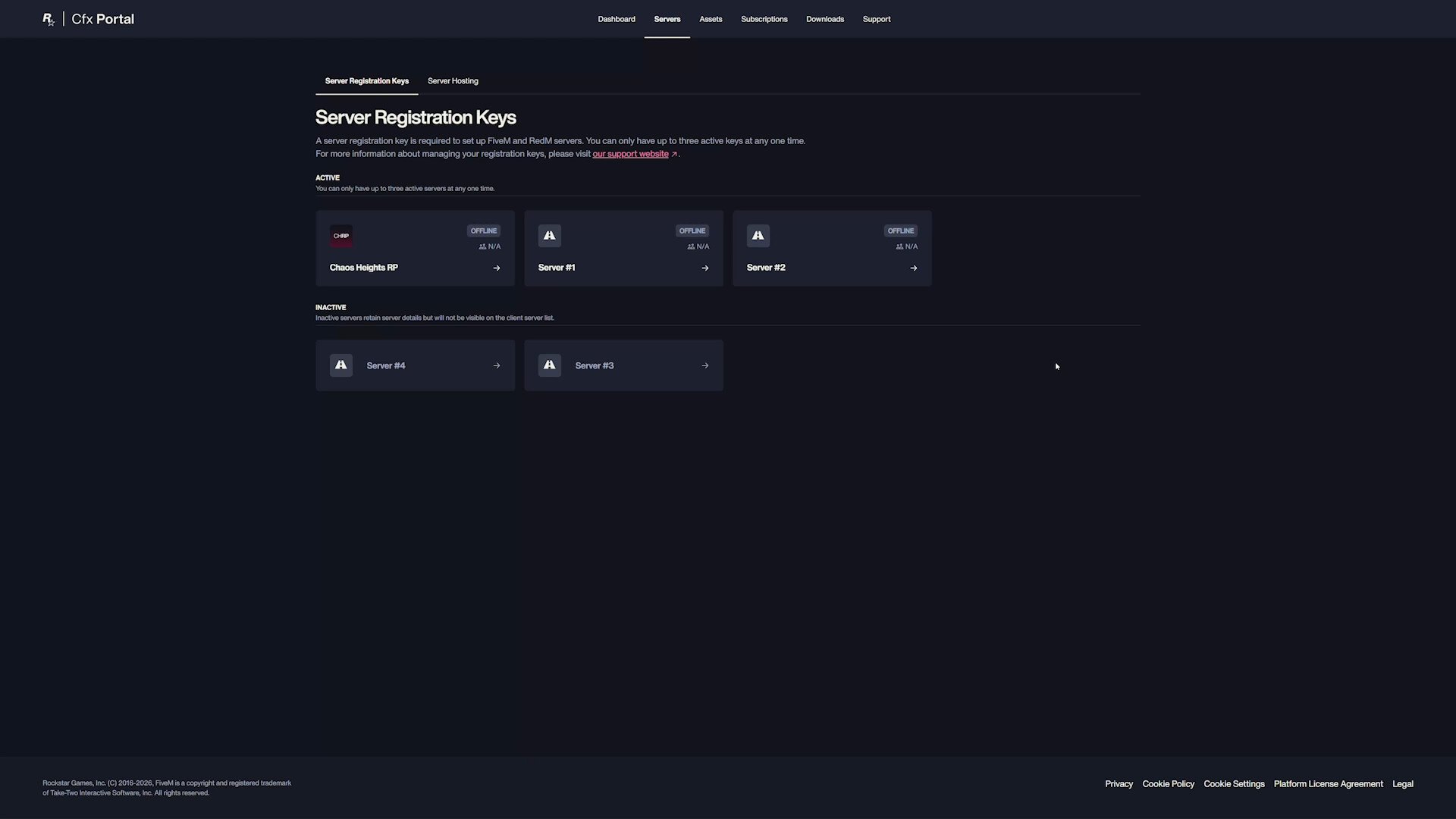
sv_licenseKeyline). - Open Servers, then Server Registration Keys. Every key on the account is a card, with active ones at the top and inactive ones underneath.
- Open the card for your server. That's where its listing details live.
- Fill in the text fields: Name, Tagline, Description and Language. Do all four, rather than guessing which ones the Portal will let you skip.
- Add up to five Tags. Pick the five that actually describe the server, because that's all the list will show.
- Upload a Banner Image and an Icon at the sizes further down, so the listing doesn't look bare even once it has a name.
- Add your Discord link under Social if you want players to find it from the listing.
- Save, then check the server list in the FiveM or RedM client. Cfx.re hasn't said how quickly the list picks up a change, so if the placeholder is still there, give it a while and refresh before you start changing anything else.
What changed on 21 October
Until now, everything a player saw about your server before joining came out of your own config. Not any more. Cfx.re's announcement puts it plainly: server metadata "was configured locally within your server's configuration files. With this update, this information will now be managed directly through the Cfx Portal." The same post says "the majority of these changes will come into effect from next week October 21, 2026", and it covers FiveM and RedM alike. Note "the majority": Cfx.re didn't say which parts land later.
These are the server.cfg lines that used to feed the listing, straight out of the default config Cfx.re ships:
sv_hostname "My Server"
sets sv_projectName "My Server"
sets sv_projectDesc "A sentence about the server"
sets tags "roleplay, serious, gangs"
sets locale "en-GB"
sets banner_detail "https://url.to/image.png"
sets banner_connecting "https://url.to/image.png"
load_server_icon myLogo.png
What Cfx.re hasn't spelled out is what happens to those lines now. The announcement says the details are managed through the Portal and stops there. So treat the Portal as the place to change your listing, and don't count on a config edit to do it. I'd leave the lines where they are for now, though. Nothing in the announcement tells you to delete them, and tearing lines out of a working config on a guess is a good way to spend an evening finding out what else read them.
The part that trips people up is step 1. The listing hangs off the server's registration key, and the key belongs to whichever Cfx.re account generated it. If a former developer or a co-owner made the key on their own account, you won't see the server in your Portal at all, and only they can edit it (or hand you a new key from your own account).
Why does my server say "Missing server data"?
Because Cfx.re didn't have recent details for it. The announcement says it "backfilled your server information if available to us recently", and that where it couldn't find historical metadata "the relevant fields will be left blank and will need to be configured manually before they can be displayed publicly."
Then the line that explains the placeholder: "If your server information is left blank, the server will be displayed as 'Missing server data (must be configured in Portal)' inside the server list."
So nothing is broken on the server itself. It just has no listing details yet, and restarting won't produce them, because Cfx.re says blank fields have to be filled in by hand before they show. That's the whole reason the steps above never touch a file.
My guess is that a server which sat offline for a while before the backfill is the likeliest to have been missed, but I can't tell you how far back "recently" reaches, because Cfx.re didn't say.
Server tags: five, and the order matters
Tags have a cap now. Cfx.re's wording is that "Servers can have up to a maximum of five unique tags", added through the Portal, and players can search the server list by them.
If your server had more than five, "the first five tags (ordered chronologically) will be displayed. Any over this amount will not." I read "chronologically" as the order they were added, which means the five that survived might not be the five you'd have chosen. It's quicker to open the server in the Portal and pick five yourself than to work out which ones made the cut, and that's why step 5 is its own step.
FiveM banner and icon sizes
The banner got bigger, and an old icon won't be big enough.
- Banner: Cfx.re recommends 2560x280 pixels, with a minimum of 1825x200.
- Icon (the profile image): 512x512 recommended, 256x256 minimum.
The numbers don't quite agree with each other, mind. The upload boxes in Cfx.re's own Portal demo say 1865x200 minimum for the banner and 512x512 minimum for the icon, in PNG or JPG (GIF only for Platinum Element Club subscribers). Make the banner 2560x280 and the icon 512x512 and you clear every version of the rule.
The icon is the one that catches people out. load_server_icon only ever took a 96x96 PNG, so the logo you've been using for years is too small to reuse. Export a fresh one from your original artwork rather than scaling the old file up, which just gives you a blurry square at a size the Portal will accept.
Adding your Discord link
There's now a proper place for it. Cfx.re says the link is added through the Portal and "will be displayed under the 'Details' section within the FiveM/RedM client, beneath the server owner's username." It's under Social on the server's Portal page, which is step 7.
It beats the old habit of cramming an invite into the server name or a tag, and with five tags to play with you'll want every one of them for actually describing the server.
Troubleshooting by symptom
I changed server.cfg and the listing didn't move. Make the same change in the Portal. That's where Cfx.re now manages listing details, so it's the edit to make whatever your config says.
My server says "Missing server data (must be configured in Portal)". No details were backfilled for it. Work through the steps at the top; there's nothing to fix in the server's own files.
Only some of my tags show up. You had more than five, and only the first five count. Trim them to five in the Portal.
I can't find my server in the Portal. Wrong account. The key was generated on a different Cfx.re account, so check who made it (a co-owner, an old developer, whoever set the server up), because only that account can edit the listing.
My server disappeared from the list after I tidied up keys. You can only have three active keys at once, and the Portal says inactive servers "retain server details but will not be visible on the client server list". Deactivating a key also deactivates any server connected to it, so check you didn't switch off the live one.
The Portal won't take my banner or icon. Check the size first. Re-export at 2560x280 and 512x512 and try again.
None of this is something a server host can fill in for you, because the details sit on your own Cfx.re account rather than on the machine running the server. The sooner they're in, the less time your players spend looking at the placeholder.