Gałąź
public
- Status
- Stabilna, domyślna
A first-person factory-automation sandbox in a fully destructible voxel world. Mine, automate, and optimise sprawling production lines with friends on an always-on dedicated server.
$11.95/mies.
$1.99 za slot (6)
Oto kilka powodów, dla których LOW.MS to idealne miejsce na Twój serwer gry.
Your FOUNDRY server is deployed and ready to join within minutes of ordering, fully configured with sensible defaults.
High clock speed Ryzen CPUs and NVMe storage keep large, complex factories ticking smoothly, because in FOUNDRY the factory, not the player count, is what pushes the hardware.
Scheduled backups protect your world, and one-click restores mean a bad day in the mines never costs you your megabase.
Server name, password, player limit, autosave, and visibility are all editable from the control panel config editor. No file hunting required.
Friends can build while you sleep, or the server can pause itself when empty. Either way, nobody has to host from their own PC.
Our team runs FOUNDRY servers themselves. If you get stuck, real humans who know the game are a ticket away.
Twoje światy FOUNDRY, ustawienia i konfiguracja modów są automatycznie kopiowane do chmury. Trzymaj do 20 kopii na serwer i zablokuj te najważniejsze, żeby nigdy nie zostały usunięte dla zwolnienia miejsca.
W zakładce Kopie zapasowe w panelu LOW.MS przywrócisz dowolną kopię jednym kliknięciem, pobierzesz ją na swój komputer albo zrobisz kopię ręcznie przed większą zmianą.
Kopie obejmują Twoje światy i ustawienia modów. Zablokowane nigdy nie są usuwane dla zwolnienia miejsca.
| Utworzono | Rozmiar | Status | Zablokowana | |
|---|---|---|---|---|
| 17/08/2026, 15:19 | 3.6 MB | Ukończona | PobierzPrzywróćUsuń | |
| 17/08/2026, 15:14 | 3.6 MB | Ukończona | PobierzPrzywróćUsuń | |
| 14/08/2026, 00:12 | 3.6 MB | Ukończona | PobierzPrzywróćUsuń | |
| 11/08/2026, 23:33 | 1.3 MB | Ukończona | PobierzPrzywróćUsuń |
What people say after they have moved a server to us.
Read our reviews on TrustpilotOut of all hosting providers. This is by far the top choice in my list. Simple UI with a mod manager included making it hassle-free when downloading specific mods.
Jose, Trustpilot review
I opened a ticket for help migrating my server from a different host. The game is Palworld and it isn't a simple process, they did it for me! Very helpful and responsive.
Justin, Trustpilot review
Their prices are pretty cheap and I thought they'd cut back on performance but damn was I wrong. The service has been insanely reliable and the Support Team are on their own level!
Anti, Trustpilot review
Obsługujemy każdą publiczną gałąź FOUNDRY na Steam od razu po wykupieniu, łącznie z prywatnymi, chronionymi hasłem. Przełączysz się z panelu sterowania w dowolnej chwili.
Hotfix Update 4
Niskie opóźnienia, gdziekolwiek są Twoi gracze
Wybierz lokalizację najbliżej swoich graczy FOUNDRY. Jeśli nie wiesz, którą wybrać, skontaktuj się ze wsparciem.
Każda lokalizacja ma ochronę DDoS, która wytrzymuje ataki do 100 Gbps.
Jeśli chcesz, żebyśmy dodali jakąś lokalizację, daj nam znać. Właściwa lokalizacja sprawia też, że serwer pojawia się we właściwym regionie w przeglądarce serwerów w grze.
Nasze centra danychEuropa
Ameryka Północna
Azja i Oceania
Znajdź odpowiedzi na częste pytania o hosting serwera FOUNDRY.
Twój serwer będzie gotowy w kilka minut
Ochrona klasy enterprise w cenie
Pomoc ekspertów, kiedy tylko jej potrzebujesz
Już od
Anuluj kiedy chcesz. Bez okresu minimalnego. Pełny zwrot w ciągu 5 dni.
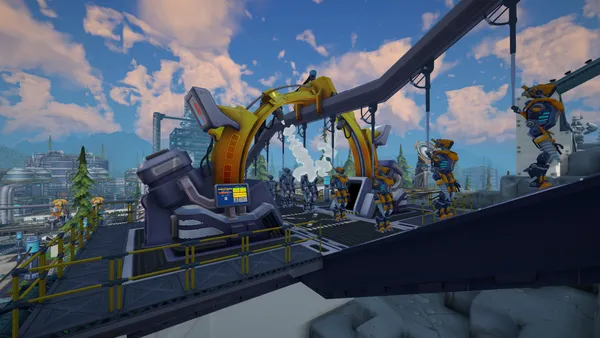
FOUNDRY is a first-person factory-building sandbox set in an endless, fully destructible voxel world. Dig for resources, wire up power grids, and grow a handful of hand-fed machines into a vast automated industrial complex. Because every block of terrain can be reshaped, your factory can burrow through mountains, span canyons, or sprawl across the surface in whatever layout you can imagine. Multiplayer is where FOUNDRY really shines. A dedicated server keeps your world online around the clock, so friends can drop in, push production forward, and log off again without anyone needing to host from their own PC. As you unlock conveyor networks, robotic arms, and full logistics systems, the factory keeps running even while nobody is connected, and the auto-pause option can freeze time whenever the server is empty. With a LOW.MS server you get instant setup, automated backups, NVMe storage, and high clock speed CPUs. That last part matters: like all factory games, FOUNDRY's performance is driven by the size and complexity of your builds more than by player count, so strong single-core performance keeps a megabase ticking smoothly.
Jesteśmy przekonani, że będziesz zadowolony z naszej usługi. Jeśli w rzadkim przypadku pojawi się problem, zrobimy wszystko, żeby go rozwiązać, albo po prostu poprosisz o zwrot pieniędzy.
Na cały hosting serwerów gier dajemy pełną, 5-dniową gwarancję zwrotu pieniędzy. Bez zbędnych pytań.
Wybór poradników i artykułów o hostingu , napisanych ręcznie przez nasz zespół wsparcia
Connect FileZilla or WinSCP to your LOW.MS server on port 2022 with the SFTP login from your control panel, find your files, and fix the usual connection and upload problems.

A complete beginner's guide to connecting to, configuring, and looking after your FOUNDRY dedicated server hosted on LOW.MS.

Seeing "Cannot connect to server. App ID specified by the server is invalid" when joining your ARK, Palworld or other Steam game server? It's a Steam client bug, not your server. Here's how to get connected.
A quick guide on getting your server upgraded
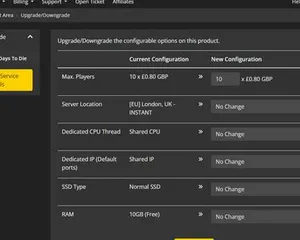
A quick guide on upgrading your LOW.MS server.
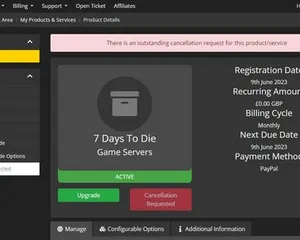
A quick guide on how to cancel your server with LOW.MS
Da się, ale przepaść między 'odpala się' a 'ekipa naprawdę może wejść' to miejsce, w którym większość domowych konfiguracji się wykłada. Oto na co się piszesz, hostując FOUNDRY samodzielnie, i czym my się zajmiemy, jeśli wolisz to pominąć.
Kilka godzin konfiguracji, potem stała obsługa.
On a Windows box, grab SteamCMD, open a terminal in its folder, then run steamcmd +login anonymous +force_install_dir C:\foundryserver +app_update 2915550 validate +quit. A spare desktop or mini-PC works, but if you plan to build a megabase, the server cares more about single-core speed and fast storage than about player count.
$ steamcmd +login anonymous +app_update 2915550 validate +quitForward 3724/UDP (game) and 27015/UDP (Steam query) on your router to the host machine's LAN IP, then add matching inbound rules in Windows Firewall. This is where most home setups fall over, especially if your ISP puts you behind CGNAT.
Stop the server, open app.cfg in the server folder, and set the basics: server name, password, world name, player limit, autosave interval, public visibility, and the pause-when-empty option. Save it, start the server again, and hope you didn't typo something that makes it boot with defaults.
Launch the dedicated server executable and watch the console until it is clearly listening on the expected ports, then try connecting from a client using direct connect to YourPublicIP:3724. If it only works on your home network, you just learned the difference between LAN and WAN the annoying way, and your upload speed now dictates everyone else's experience.
Now you get to run an always-on PC: power settings, sleep states, Windows reboots, and the moment someone trips a breaker your 24/7 server becomes "whenever I'm home". Patch days are extra fun because the server and every client need matching versions, and you should be making your own backups, because save corruption is a matter of when, not if.
When players can't see the server, it's you checking port forwards, firewall rules, and logs late at night, not a magic button. You'll eventually have a little folder of known fixes and a big pile of "why is it doing that".
Złóż zamówienie na górze tej strony, a my zajmiemy się wszystkimi sześcioma krokami.
Ceny widoczne od razu. Bez zakładania konta.
Jeśli wolisz najpierw spróbować samodzielnie, nasze poradniki FOUNDRY powyżej przeprowadzą Cię przez konfigurację SteamCMD. Będziemy tu, gdybyś później chciał się przenieść.
Uruchamiaj, zatrzymuj i zarządzaj serwerem FOUNDRY w przeglądarce. Ustawienia serwera, pliki, SFTP i kopie zapasowe znajdziesz w panelu sterowania.
Nexus jest już dostępny dla obsługiwanych gier i oferuje wbudowane narzędzia do zarządzania serwerem. Istniejące serwery mogą nadal korzystać z TCAdmin. Nasz zespół pomoże Ci znaleźć odpowiedni panel.
Więcej informacjiJoin our Discord to chat with our staff and community!
Join Discord