Branch
public
- Status
- Stable · Default
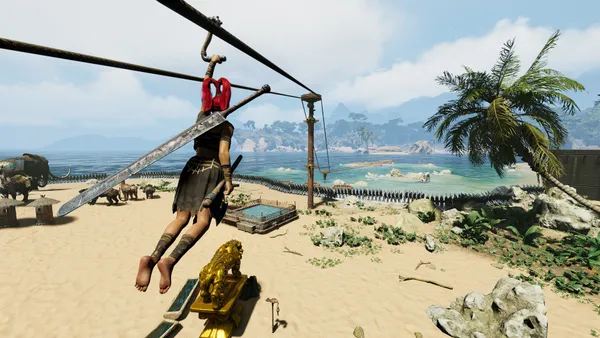
A tribe-focused survival sandbox where an ancient mask changes everything. Start from nothing, build and defend a settlement, recruit followers, and uncover mysteries as you grow your clan into a thriving force.
Below are a few reasons why LOW.MS is the ideal place to host your game server.
Begin playing on your Soulmask server within minutes after payment.
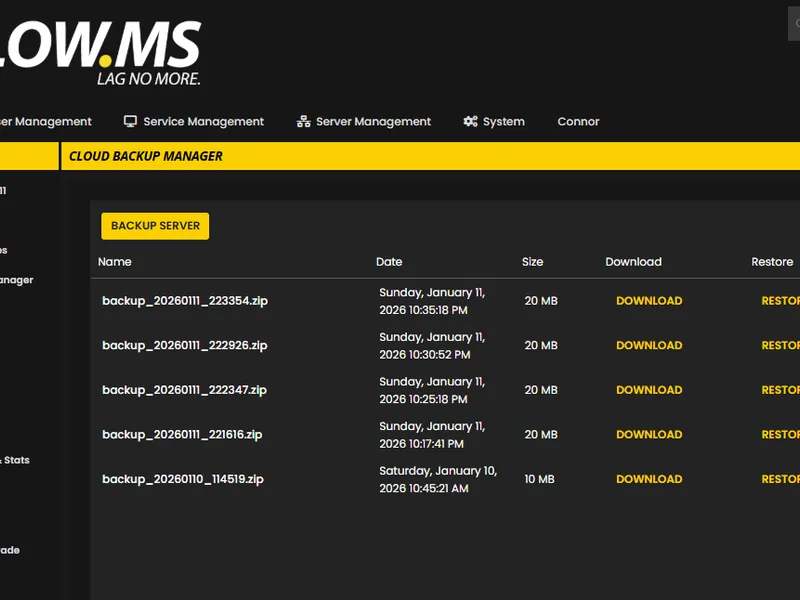
Never lose your Soulmask save again with our state of the art cloud backup system.
Your Soulmask server will be equipped with the latest Intel or AMD processors and NVMe SSDs.
All of our datacenter networks have enterprise-level DDOS protection to ensure your Soulmask server hosting never goes down.
Round-the-clock customer assistance with a 99.9% uptime guarantee to ensure your Soulmask server never goes offline.
Full refund within the first 5 days if your Soulmask server is not up to scratch.
Never lose your Soulmask progress again with our advanced cloud backup system. We automatically create regular backups of your game server, ensuring your world, configurations, and player data are always safe.
Our intuitive Backup Manager gives you complete control over your server backups. Easily restore to any previous point, download backups locally, or create manual snapshots before making big changes.
Out of all hosting providers. This is by far the top choice in my list. Simple UI with a mod manager included making it hassle-free when downloading specific mods.
— Jose
I opened a ticket for help migrating my server from a different host. The game is Palworld and it isn't a simple process, they did it for me! Very helpful and responsive.
— Justin
Their prices are pretty cheap and I thought they'd cut back on performance but damn was I wrong. The service has been insanely reliable and the Support Team are on their own level!
— Anti
We support every public Soulmask Steam branch out of the box, including the private password-protected ones. Switch from your control panel any time.
public_test(new)

United States
Bend, OR
Los Angeles, CA
Phoenix, AZ
Dallas, TX
Miami, FL
Ashburn, VA
Europe
London, UK
Nuremberg, DE
Helsinki, FI
Warsaw, PL
Asia & Oceania
Singapore, SG
Sydney, AU
Melbourne, AU
We've got you covered!
We have a wide variety of locations available for your Soulmask server. If you need help choosing a location, contact support.
All locations feature DDoS protection which can withstand attacks of up to 100 Gbps. Keeping your game server safe, no matter where in the world it may be.
Is there a location you would like to see? Let us know! Having the correct location helps your service show up correctly in the server list.
Find answers to common questions about Soulmask server hosting.
Soulmask is a tribe-focused survival sandbox developed by CampFire Studio. You wear an ancient mask, recruit and manage unique tribesmen — each with their own combination from over 871 Talents, Masteries, and Likes — build automated production lines, and grow a settlement from nothing into a thriving community. The game supports up to 70 players on a dedicated server.
Soulmask dedicated servers support up to 70 players, though the default is 20. You can adjust this with the -MaxPlayers startup parameter. LOW.MS offers slot tiers from 10 to 50, so you can pick what fits your group and upgrade later if you need more room.
Soulmask 1.0 introduced three modes: Tribe Mode (recruit tribesmen, build production lines, grow your settlement), Survival Mode (traditional survival focused on personal skill), and Warrior Mode (combat-focused with more enemies and challenges). Currently, only Survival Mode is available on dedicated servers — CampFire Studio plans to enable Tribe Mode and Warrior Mode for dedicated servers in a future update.
The Soulmask server process needs around 11-12 GB of RAM just to start, and usage grows as the world develops. The community widely recommends at least 16 GB for stable operation. All LOW.MS plans include 10 GB RAM as standard, and you can upgrade to 15 GB, 20 GB, 25 GB, or 30 GB as your world grows.
Yes — Soulmask supports Steam Workshop mods on dedicated servers. You can browse and subscribe to mods through the Steam Workshop, then configure your server to load them. Keep in mind that mods can affect server stability, so it's worth testing new mods before adding them to a busy server.
Launch Soulmask, select Online Game from the main menu, and use the Server Browser to find your server by name. You can also use the direct connect option with the IP and port shown in your LOW.MS control panel. Make sure your game version matches the server version — version mismatches are the most common cause of connection failures.
Yes, though it requires a server restart. PvP and PvE are set via startup flags (-pvp or -pve). You can also configure raid windows using the RuQinBeginHour and RuQinEndHour settings in GameXishu.json to restrict building damage to specific hours, which helps prevent offline raiding.
Set the -adminpsw startup parameter to your chosen password. In-game, press the tilde key (~) to open the console, type gm key YourPassword, then enter the password in the GM panel that appears and click Become the Admin. This gives you access to the full GM Menu for managing settings, spawning items, and handling players.
Yes — that's one of the biggest reasons to run a dedicated server. Your tribesmen continue their assigned tasks around the clock: gatherers collect resources, crafters work through production queues, guards patrol, and farmers tend crops, all while you're offline.
LOW.MS takes automated cloud backups of your server, stored separately from the game files for extra safety. On top of that, Soulmask's built-in system saves the world every 10 minutes (configurable via the -saving parameter) and creates a backup every 15 minutes (via -backup). You can also trigger manual backups through the Cloud Backup option in your control panel at any time.
Your Soulmask is set up instantly after payment, allowing you to start hosting without delays.
Yes! Our user-friendly control panel gives you full control over game modes, maps, and server configurations over your Soulmask server.
We provide 24/7 support for your Soulmask server through live chat and email to assist you with any questions or technical issues.
Absolutely. If you're not satisfied with your Soulmask server. We provide a full refund within the first 5 days.
Our Soulmask servers use top-tier Intel or AMD hardware to ensure your server runs super smoothly!
Your server will be ready within minutes
Enterprise-grade protection included
Expert help whenever you need it
Starting from
Cancel anytime. No minimum term. Full refund within 5 days.
Soulmask is a tribe-focused survival sandbox from CampFire Studio where you wear an ancient mask, recruit tribesmen with unique talents, and build a thriving settlement from nothing. With over 871 unique Talents, Masteries, and Likes across your tribesmen, the depth of tribe management sets it apart from other survival games. Version 1.0 introduced three game modes — Tribe Mode for settlement builders, Survival Mode for purists, and Warrior Mode for combat enthusiasts — along with the free Shifting Sands DLC that adds an Egypt-themed map. Soulmask supports up to 70 players on a dedicated server with full Steam Workshop mod support, extensive server customisation through hundreds of settings, and 24/7 tribesmen automation that keeps your production lines running while you're offline.

We are confident that you'll be happy with our service. If on the rare occasion there is a problem with your service, we will do our absolute best to get things working for you, or you can simply ask for your money back.
We have a full 5 day money-back guarantee on all our game server hosting. No questions asked.
A selection of hosting guides and articles, hand-written by our own support team

Diagnose and fix common Soulmask dedicated server problems including connection failures, crashes, performance issues, save corruption, and version mismatches.

A comprehensive guide to every Soulmask dedicated server setting. Learn how to configure gameplay rules, resource rates, PvP settings, tribe options, backup schedules, and performance tuning.

Learn how to set up, configure, and connect to your Soulmask dedicated server. This step-by-step guide covers ordering, initial configuration, connecting players, and tribe management basics.
Find your Soulmask world save files and upload them to your dedicated server using File Manager or SFTP.
Our brand new control-panel will soon be available for Soulmask server hosting. Featuring everything our existing control panel has, but with an all new intuitive and sleek looking interface. Including a fully advanced file manager, mod installation and so on.
Our own in-house development team have been working on this since 2021, and it will take the industry by storm. Click the button below to learn more about it. Until the new control panel is released, you'll still have access to our feature-packed TCAdmin server control panel.