Preços anunciados no lançamento
Por que a LOW.MS?
Veja alguns motivos que fazem da LOW.MS o lugar ideal para hospedar seu servidor de jogos.
Console and mobile players welcome
One world your friends can join from a phone, a Switch, an Xbox, a PlayStation or a PC, without a bridge or a proxy in the middle.
Bring your existing world
Upload a single player or Realms world and carry on where you left off, with your builds and your progress intact.
Automatic backups
Worlds get backed up on a schedule and restored from the panel, so a bad night is an inconvenience rather than a loss.
Behaviour and resource packs
Install and manage packs from the panel to change gameplay, mobs, loot and visuals across the whole server.
Allowlist and operators
Decide who gets in and who gets commands, edited from the panel instead of a text file over FTP.
Update on your terms
Take a Mojang release when your packs and add-ons are ready for it, rather than the moment it lands.
Backups automáticos em nuvem
Seus mundos, configurações e mods de Minecraft: Bedrock Edition são copiados para a nuvem automaticamente. Guarde até 20 backups por servidor e bloqueie os que importam para que nunca sejam apagados para abrir espaço.
Na aba Backups do painel de controle da LOW.MS você restaura qualquer backup com um clique, baixa uma cópia para o seu PC ou cria um backup manual antes de uma mudança grande.
- Backups automáticos e agendados, guardados fora do seu servidor
- Bloqueie os backups importantes para que nunca sejam sobrescritos
- Restauração com um clique ou download de qualquer backup para o seu PC
- Incluso em todo servidor Minecraft: Bedrock Edition, sem custo extra
Os backups incluem seus mundos e as configurações dos mods. Os bloqueados nunca são apagados para abrir espaço.
| Criado em | Tamanho | Status | Bloqueado | |
|---|---|---|---|---|
| 17/08/2026, 15:19 | 3.6 MB | Concluído | BaixarRestaurarExcluir | |
| 17/08/2026, 15:14 | 3.6 MB | Concluído | BaixarRestaurarExcluir | |
| 14/08/2026, 00:12 | 3.6 MB | Concluído | BaixarRestaurarExcluir | |
| 11/08/2026, 23:33 | 1.3 MB | Concluído | BaixarRestaurarExcluir |
Rated 4.8 out of 5 on Trustpilot
What people say after they have moved a server to us.
Read our reviews on TrustpilotTop choice in my list
Out of all hosting providers. This is by far the top choice in my list. Simple UI with a mod manager included making it hassle-free when downloading specific mods.
Jose, Trustpilot review
Very helpful and responsive
I opened a ticket for help migrating my server from a different host. The game is Palworld and it isn't a simple process, they did it for me! Very helpful and responsive.
Justin, Trustpilot review
Insanely reliable service
Their prices are pretty cheap and I thought they'd cut back on performance but damn was I wrong. The service has been insanely reliable and the Support Team are on their own level!
Anti, Trustpilot review
13 Localizações dos servidores
Baixa latência onde quer que seus jogadores estejam
Escolha o local mais próximo dos seus jogadores de Minecraft: Bedrock Edition. Se não souber qual escolher, fale com o suporte.
Todos os locais têm proteção DDoS capaz de absorver ataques de até 100 Gbps.
Se quiser que a gente adicione algum local, avise. O local certo também coloca seu servidor na região certa da lista de servidores do jogo.
Nossos datacentersEuropa
- Amsterdã, NL
- Nuremberg, DE
- Helsinque, FI
- Varsóvia, PL
América do Norte
- Ashburn, VA
- Miami, FL
- Dallas, TX
- San José, CA
- Los Angeles, CA
- Bend, OR
Ásia e Oceania
- Singapura, SG
- Sydney, AU
- Melbourne, AU
Perguntas frequentes
Encontre respostas para as dúvidas mais comuns sobre hospedagem de servidor Minecraft: Bedrock Edition.
Pronto para hospedar seu servidor Minecraft: Bedrock Edition?
Ativação instantânea
Seu servidor fica pronto em poucos minutos
Proteção DDoS
Proteção de nível empresarial inclusa
Suporte 24/7
Ajuda especializada sempre que você precisar
Cancele quando quiser. Sem prazo mínimo. Reembolso integral em 5 dias.
O que é Minecraft: Bedrock Edition
Minecraft: Bedrock Edition is the version that runs on Windows, iOS, Android, PlayStation, Xbox and Nintendo Switch, and a Bedrock Dedicated Server is the straightforward way to give all of those players one shared world. If your friends play on phones or consoles, this is the server you want. Mojang publishes the Bedrock Dedicated Server for Windows and Linux, and it is a genuinely different piece of software from the Java server: different config file, different addon format, different permissions model. Behaviour packs and resource packs replace Java plugins, and third-party server software such as PowerNukkitX or Endstone opens up plugin support for anyone who wants it. We already host Java Edition. Bedrock is the missing half, and we are building the template now: world uploads, behaviour and resource pack management, allowlist and operator editing, automatic backups, and control over when a Mojang release lands on your world. Watch this page for the order button.
Garantia de reembolso
Temos certeza de que você vai gostar do nosso serviço. Se, nas raras vezes em que algo der errado, houver um problema com o seu serviço, faremos o possível para resolver ou você simplesmente pede seu dinheiro de volta.
Temos garantia de reembolso de 5 dias em toda a nossa hospedagem de servidores de jogos. Sem perguntas.
Artigos da base de conhecimento
Uma seleção de guias e artigos sobre hospedagem de , escritos à mão pela nossa própria equipe de suporte
Connecting to Your Server with SFTP (Port 2022)
Connect FileZilla or WinSCP to your LOW.MS server on port 2022 with the SFTP login from your control panel, find your files, and fix the usual connection and upload problems.

Fixing "Cannot Connect to Server. App ID Specified by Server Is Invalid" on Steam
Seeing "Cannot connect to server. App ID specified by the server is invalid" when joining your ARK, Palworld or other Steam game server? It's a Steam client bug, not your server. Here's how to get connected.
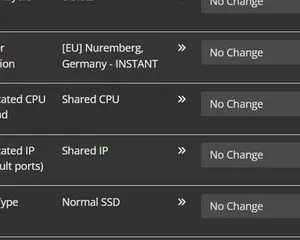
Upgrading your server
A quick guide on getting your server upgraded
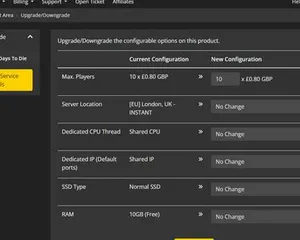
Upgrading / downgrading your LOW.MS server
A quick guide on upgrading your LOW.MS server.
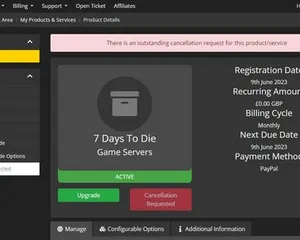
Cancelling your server
A quick guide on how to cancel your server with LOW.MS
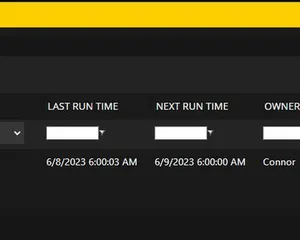
How to use the scheduled tasks via control panel
Easily create scheduled tasks to make your server run smoothly.
Painel de controle de última geração
Inicie, pare e gerencie seu servidor de Minecraft: Bedrock Edition pelo navegador. Acesse configurações, arquivos, SFTP e backups no painel de controle.
O Nexus já está disponível para jogos compatíveis, com ferramentas integradas de gerenciamento de servidores. Servidores existentes ainda podem usar o TCAdmin; nossa equipe pode ajudar você a encontrar o painel certo.
Mais informações