Branch
public
- Status
- Stabil · Standard
Multiplayer BeamNG.drive servers with your own maps, mods and player limits.
Preise werden zum Start bekannt gegeben
Hier sind ein paar Gründe, warum LOW.MS der ideale Ort ist, um Ihren Spielserver zu hosten.
Add your Keymaster AuthKey to list the server in the BeamMP browser, or keep it private and share the IP and port with friends for Direct Connect.
Run a stock map or upload a map mod to Resources/Client and point the Map setting at it. Players download it automatically when they join.
Drop vehicle mod zips into Resources/Client and every player who joins gets the same cars, with no manual installs on their side.
Choose how many players can join and how many cars each one can spawn, so a big session stays playable.
Watch joins, chat and server output in real time from the control panel and run server commands without a remote desktop.
Your server gets its own IP and port on our network, so there is no router setup, firewall rules or home connection to worry about.
Ihre BeamMP Welten, Einstellungen und Mod-Konfiguration werden automatisch in der Cloud gesichert. Behalten Sie bis zu 20 Backups pro Server und sperren Sie die wichtigen, damit sie nie gelöscht werden, um Platz zu schaffen.
Über den Tab Backups im LOW.MS Control Panel stellen Sie jedes Backup mit einem Klick wieder her, laden eine Kopie auf Ihren PC herunter oder erstellen vor einer großen Änderung ein manuelles Backup.
Backups enthalten Ihre Welten und Mod-Einstellungen. Gesperrte Backups werden nie gelöscht, um Platz zu schaffen.
| Erstellt | Größe | Status | Gesperrt | |
|---|---|---|---|---|
| 17/08/2026, 15:19 | 3.6 MB | Abgeschlossen | HerunterladenWiederherstellenLöschen | |
| 17/08/2026, 15:14 | 3.6 MB | Abgeschlossen | HerunterladenWiederherstellenLöschen | |
| 14/08/2026, 00:12 | 3.6 MB | Abgeschlossen | HerunterladenWiederherstellenLöschen | |
| 11/08/2026, 23:33 | 1.3 MB | Abgeschlossen | HerunterladenWiederherstellenLöschen |
What people say after they have moved a server to us.
Read our reviews on TrustpilotOut of all hosting providers. This is by far the top choice in my list. Simple UI with a mod manager included making it hassle-free when downloading specific mods.
Jose, Trustpilot review
I opened a ticket for help migrating my server from a different host. The game is Palworld and it isn't a simple process, they did it for me! Very helpful and responsive.
Justin, Trustpilot review
Their prices are pretty cheap and I thought they'd cut back on performance but damn was I wrong. The service has been insanely reliable and the Support Team are on their own level!
Anti, Trustpilot review
Wir unterstützen jeden öffentlichen BeamMP-Steam-Branch standardmäßig, einschließlich der privaten passwortgeschützten Branches. Wechseln Sie jederzeit über Ihr Control Panel.
No updates - DirectX9 - 0.4.0.6
Niedrige Latenz, wo auch immer deine Spieler sind
Wähle den Standort, der deinen BeamMP-Spielern am nächsten ist. Wenn du unsicher bist, welcher passt, wende dich an den Support.
Jeder Standort hat einen DDoS-Schutz, der Angriffe bis 100 Gbps abfängt.
Wenn du dir einen weiteren Standort wünschst, sag uns Bescheid. Der richtige Standort sorgt auch dafür, dass dein Server im Serverbrowser unter der richtigen Region erscheint.
Unsere RechenzentrenEuropa
Nordamerika
Asien & Ozeanien
Finden Sie Antworten auf häufige Fragen zum BeamMP-Server-Hosting.
Ihr Server ist innerhalb weniger Minuten bereit
Enterprise-Level-Schutz inklusive
Experten-Hilfe, wann immer Sie sie brauchen
Jederzeit kündbar. Keine Mindestlaufzeit. Volle Rückerstattung innerhalb von 5 Tagen.
BeamMP turns BeamNG.drive's soft-body physics into a shared sandbox. Host your own BeamMP server and drive, crash and race with friends on stock or modded maps, with your own vehicle and map mods loaded for everyone who joins. Set the server name, player limit, cars per player and map, then list it publicly in the BeamMP server browser or keep it private for direct connect only.


Wir sind zuversichtlich, dass Sie mit unserem Service zufrieden sein werden. Wenn es in seltenen Fällen ein Problem mit Ihrem Service gibt, werden wir unser Möglichstes tun, um die Dinge für Sie zum Laufen zu bringen, oder Sie können einfach Ihr Geld zurückverlangen.
Wir haben eine volle 5-tägige Geld-zurück-Garantie auf all unser Game-Server-Hosting. Keine Fragen.
Eine Auswahl an -Hosting-Anleitungen und Artikeln, handgeschrieben von unserem Support-Team
Connect FileZilla or WinSCP to your LOW.MS server on port 2022 with the SFTP login from your control panel, find your files, and fix the usual connection and upload problems.
Seeing "Cannot connect to server. App ID specified by the server is invalid" when joining your ARK, Palworld or other Steam game server? It's a Steam client bug, not your server. Here's how to get connected.
A quick guide on getting your server upgraded
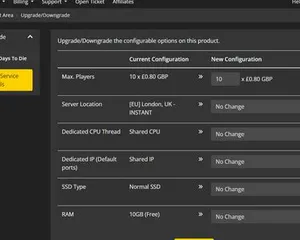
A quick guide on upgrading your LOW.MS server.
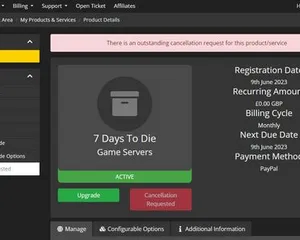
A quick guide on how to cancel your server with LOW.MS
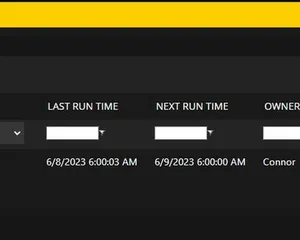
Easily create scheduled tasks to make your server run smoothly.
Machbar, aber die Lücke zwischen 'er bootet' und 'deine Crew kann sich wirklich einloggen' ist der Punkt, an dem die meisten Heim-Setups scheitern. So sieht es aus, wenn du BeamMP selbst hostest, und was wir übernehmen, wenn du es lieber überspringst.
Ein paar Stunden Einrichtung, danach laufende Pflege.
Grab BeamMP-Server.exe from the BeamMP-Server releases page on GitHub and install the Microsoft Visual C++ Redistributable it needs.
$ steamcmd +login anonymous +app_update 284160 validate +quitRun the server once so it creates ServerConfig.toml next to the exe, then stop it before editing.
Sign in to keymaster.beammp.com with Discord, create a key and paste it into AuthKey. One key works on one server at a time.
Edit Name, Map, MaxPlayers and MaxCars, and set Private to false if you want it in the server list.
Forward port 30814 on TCP and UDP on your router and allow the server through Windows Firewall in both directions.
Put vehicle and map zips in Resources/Client, start the server and join from the BeamMP server list or Direct Connect.
Bezahl oben auf der Seite und wir kümmern uns um alle sechs Schritte.
Preise sichtbar von Anfang an. Keine Anmeldemauer.
Wenn du es lieber zuerst selbst probieren willst, unsere BeamMP-Guides oben erklären das SteamCMD-Setup. Wir sind da, wenn du später migrieren möchtest.
Starte, stoppe und verwalte deinen BeamMP-Server im Browser. Im Control-Panel findest du Servereinstellungen, Dateien, SFTP und Backups.
Nexus ist jetzt für unterstützte Spiele verfügbar und bietet integrierte Werkzeuge zur Serververwaltung. Bestehende Server nutzen möglicherweise noch TCAdmin. Unser Support hilft dir, das richtige Panel für deinen Server zu finden.
Mehr InfosJoin our Discord to chat with our staff and community!
Join Discord