Why LOW.MS?
Below are a few reasons why LOW.MS is the ideal place to host your game server.
Crossplay default-on
Steam, Xbox, PS5, and Mac players all join the same server — no config, no upgrade, no extra plan needed.
Painless host migration
Moving from another Palworld host? We move your world, base, and Pals across for you — automatic for common hosts, hands-on help for the rest.
Every .ini tweak in the browser
Edit PalWorldSettings.ini for capture rates, XP, damage, and hatching time through Configuration Files — and our docs cover the WorldOption.sav override bug that silently breaks settings.
Generous RAM, no overfilled nodes
Pocketpair recommends 16 GB for a Palworld server — we start at 10 GB, scale to 30 GB, and never stack servers tight on our hardware.
Nexus Mods with the right UE4SS
Drop .pak mods into File Manager — we ship the Palworld-specific RE-UE4SS build, not the generic one that crashes servers post-patch 0.4.1.5.
DDoS protection built in
Palworld servers attract the server-browser crowd hard — enterprise DDoS protection is standard on every plan, not a paid upgrade.
Automatic Cloud Backups
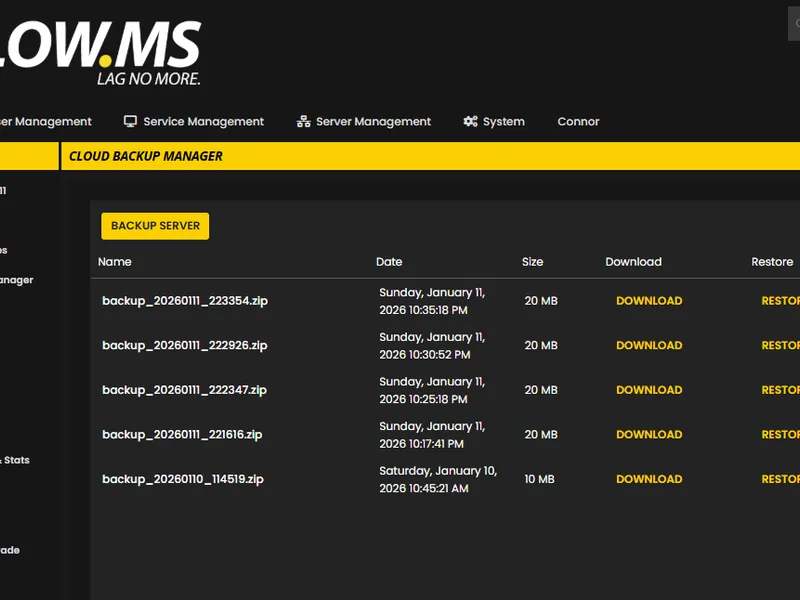
Never lose your Palworld progress again with our advanced cloud backup system. We automatically create regular backups of your game server, ensuring your world, configurations, and player data are always safe.
Our intuitive Backup Manager gives you complete control over your server backups. Easily restore to any previous point, download backups locally, or create manual snapshots before making big changes.
- Automatic scheduled backups
- One-click restore functionality
- Download backups anytime
- A must have for your Palworld server hosting
Top choice in my list
Out of all hosting providers. This is by far the top choice in my list. Simple UI with a mod manager included making it hassle-free when downloading specific mods.
— Jose
Very helpful and responsive
I opened a ticket for help migrating my server from a different host. The game is Palworld and it isn't a simple process, they did it for me! Very helpful and responsive.
— Justin
Insanely reliable service
Their prices are pretty cheap and I thought they'd cut back on performance but damn was I wrong. The service has been insanely reliable and the Support Team are on their own level!
— Anti

United States
Bend, OR
Los Angeles, CA
Phoenix, AZ
Dallas, TX
Miami, FL
Ashburn, VA
Europe
London, UK
Nuremberg, DE
Helsinki, FI
Warsaw, PL
Asia & Oceania
Singapore, SG
Sydney, AU
Melbourne, AU
12 Server Locations
We've got you covered!
We have a wide variety of locations available for your Palworld server. If you need help choosing a location, contact support.
All locations feature DDoS protection which can withstand attacks of up to 100 Gbps. Keeping your game server safe, no matter where in the world it may be.
Is there a location you would like to see? Let us know! Having the correct location helps your service show up correctly in the server list.
Frequently Asked Questions
Find answers to common questions about Palworld server hosting.
As standard you'll have up to 10GB RAM. You can upgrade this at anytime through the control panel.
Palworld dedicated servers cap out at 32 concurrent players, and that's still current as of 2026. You can choose your slot count when ordering. Most co-op groups we host sit somewhere between 4 and 16 regulars, so don't feel like you need to buy the maximum — buy what fits the people who'll actually log in.
Yes, all Palworld servers hosted by LOW.MS will be fully compatible with Steam.
Yes. Crossplay has been stable and default-on since Palworld v0.5.0 in March 2025. Players on Steam, Xbox, PlayStation 5, and Mac can all play together with no additional configuration. The one gotcha: Xbox and PlayStation players can't enter an IP directly, so they need to find your server by name in the in-game community server browser. Pick a distinctive server name and they'll find you.
Currently Palworld servers take about 2 minutes to set-up from the moment you pay for your order.
Provisioning is automatic. You'll have your server details in your email within a couple of minutes of checkout, and the server itself is ready to connect to a few seconds after that.
Currently the server list is very overloaded. The server will appear occasionally and we're waiting for the developers to make more fixes for this.
PC players on Steam can use either the in-game community server browser or Direct Connect with the IP and port from your control panel. Xbox and PS5 players can only use the in-game community browser, so make sure your server has a distinctive name for them to search on. Our [server list and password issues guide](/knowledgebase/palworld-server-list-and-password-issues) covers the browser quirks.
If you have a server password set and you directly connect, it currently throws you back to the main menu with "Incorrect password". A known bug they're trying to fix.
Yes of course! We'll help you move your save over, and we even have an automatic tool for some hosts!
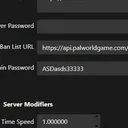
Yes, that's what PalWorldSettings.ini is for. You can adjust experience multipliers, capture rates, hatching time, death penalty, day and night speed, damage multipliers and plenty more. One gotcha worth knowing: once a world has been created, changes to the .ini silently stop taking effect because WorldOption.sav in the save folder overrides them. Our [increasing max pals guide](/knowledgebase/increasing-max-pals-on-your-server) walks through the fix. For the full settings reference see [Server configuration for Palworld](/knowledgebase/server-configuration-for-palworld).
Every LOW.MS Palworld plan includes automatic cloud backups, so you can roll the world back from the control panel if something goes wrong. If memory is the issue you can upgrade your plan at any time. The single biggest memory tweak most operators don't know about is setting `bEnableInvaderEnemy=False`, which genuinely helps with the memory creep on long-running servers.
No! We have very generous RAM packages, and do not overfill our nodes. Crashing is not a thing with us.
Yes. Palworld mods are .pak files plus UE4SS scripted mods, mostly hosted on Nexus Mods (there's no Steam Workshop integration). Heads up: post-patch 0.4.1.5 you need the Palworld-specific RE-UE4SS build, not the generic UE4SS — the generic version will crash your server. Every player connecting needs matching mod files locally, so keep your group in sync. Our [mods guide](/knowledgebase/how-can-i-add-mods-to-my-palworld-server) walks through installation.
Set an `AdminPassword` in PalWorldSettings.ini, connect to your server, open chat, and type `/AdminPassword
Yes. Our [migration guide](/knowledgebase/migrating-to-lowms-from-another-host) walks through the process, and our support team can help if you hit anything unusual. You can also import an existing single-player save — see [converting your Palworld save](/knowledgebase/converting-palworld-save) for how.
Pocketpair officially recommends 16 GB of RAM for a dedicated server. In practice it depends on how big your base gets and how many players you're hosting. Our plans come with generous RAM as standard, and you can scale up from the control panel if your server starts stuttering. See the [Palworld hosting page](/game-servers/palworld-server-hosting) for current options.
Your Palworld is set up instantly after payment, allowing you to start hosting without delays.
Yes! Our user-friendly control panel gives you full control over game modes, maps, and server configurations over your Palworld server.
We provide 24/7 support for your Palworld server through live chat and email to assist you with any questions or technical issues.
Absolutely. If you're not satisfied with your Palworld server. We provide a full refund within the first 5 days.
Our Palworld servers use top-tier Intel or AMD hardware to ensure your server runs super smoothly!
Ready to host your Palworld server?
Instant Setup
Your server will be ready within minutes
DDoS Protection
Enterprise-grade protection included
24/7 Support
Expert help whenever you need it
Starting from
Cancel anytime. No minimum term. Full refund within 5 days.
What is Palworld
Palworld is Pocketpair's open-world survival game where you fight, farm, build and team up with creatures called Pals. You can ride them, put them to work in your base, send them into battle, or eat them — Pocketpair has never been particularly squeamish about the trade-offs. We've been hosting Palworld dedicated servers since the game launched in January 2024, and crossplay between Steam, Xbox, PS5 and Mac has been default-on across all our plans since v0.5.0. Servers run on TCAdmin with automatic cloud backups, DDoS protection and 24/7 support, and you can pick a region at checkout. The 32-player cap is still where Pocketpair has it set in 2026 — that's the ceiling we offer plans up to.


Money-back Guarantee
We are confident that you'll be happy with our service. If on the rare occasion there is a problem with your service, we will do our absolute best to get things working for you, or you can simply ask for your money back.
We have a full 5 day money-back guarantee on all our game server hosting. No questions asked.
Knowledgebase Articles
A selection of hosting guides and articles, hand-written by our own support team

How to Add Mods to Your Palworld Server
How to install Palworld server mods: .pak files, RE-UE4SS script mods, and Workshop server mods explained, plus one-click RE-UE4SS setup on LOW.MS.

Palworld players forced to create a new character (UE4SS character reset bug)
UE4SS has an open regression that makes every Palworld player look like a new player on connect, even though their save files are still on disk. This is the diagnosis and fix.

Palworld Server Troubleshooting Guide
A step-by-step guide to resolve server and client connection issues

Palworld Save Location & How to Upload Your World
Find your Palworld singleplayer save files and upload them to your dedicated server using File Manager or SFTP.
Server configuration for Palworld
Guide for customizing your Palworld server

Getting Started with Your Palworld Dedicated Server
A comprehensive guide to setting up, connecting to, and managing your new Palworld dedicated server hosted on LOW.MS.
Cutting Edge Control Panel
Our brand new control-panel will soon be available for Palworld server hosting. Featuring everything our existing control panel has, but with an all new intuitive and sleek looking interface. Including a fully advanced file manager, mod installation and so on.
Our own in-house development team have been working on this since 2021, and it will take the industry by storm. Click the button below to learn more about it. Until the new control panel is released, you'll still have access to our feature-packed TCAdmin server control panel.
