This one comes up in support tickets a lot: "how do I get the new maps onto my Hell Let Loose server?" Every time HLL ships a patch the map list grows, and if your server was provisioned before the patch your rotation won't pick the new maps up automatically. The fix is a two-minute edit in Configuration Files – here's the short version.
If you provisioned recently, the latest maps are already in your rotation and you can skip straight to the reorder/trim steps.
The two files you care about
Your live panel is TCAdmin at control.low.ms. Open your Hell Let Loose service, go to Configuration Files in the sidebar, and you'll see the two files that control map selection:
- Server.ini – sets the startup map (the map the server loads on first boot after a restart)
- MapRotation.ini – the ordered list of maps the server cycles through after each match
Those names haven't changed across HLL updates, so any guide you find that references them is still valid today.
Adding a map to the rotation
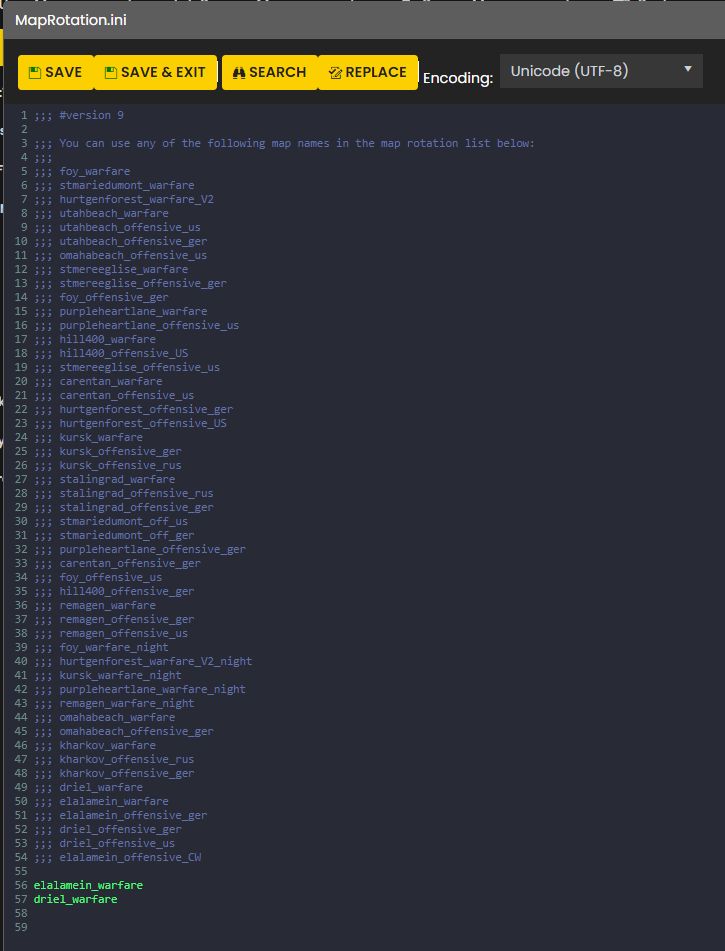
Open MapRotation.ini and add the map name on its own line. One map per line, in the order you want them played. Save the file and restart the server for the change to take effect.
If you only want a specific pair of maps on rotation (e.g. a night-ops weekend), delete everything else and leave just those two lines in. The server will loop them.
Want the rotation randomised instead of strict? Add this at the top of the file:
Shuffle = true
Changing the startup map
Open Server.ini and set the startup map to one of the valid map names, e.g. carentan_warfare_night. The command line updates automatically – you don't need to touch Commandline Manager separately. We recommend always setting the startup map here rather than hand-editing the command line, because it's one less place to get out of sync.
If you do want to set the startup map via Commandline Manager (for example, you're scripting something), note that after the first match the server will roll onto whatever MapRotation.ini says next, so you still need the rotation file to match.

Example of the MapRotation.ini for HLL:
A note on map names
Hell Let Loose ships new maps and new variants (day/night, warfare/offensive, weather) with most major patches. The exact map name strings are whatever the current game build expects – we don't maintain a master list here because it would go stale every time Black Matter ships a patch. For the authoritative list, check the official HLL patch notes after each update, or grab the names from a known-good rotation file on a recently provisioned server.
If you can't get the server to load a map after editing the file, nine times out of ten it's a typo in the map name – they're case sensitive and the underscores matter. Drop us a support ticket and we'll sanity-check the file with you.
If you haven't set up your HLL server yet, the Hell Let Loose server configuration KB covers the rest of the Configuration Files you'll want to look at, and the hosting page has current plans and regions.