Branch
public
- Status
- Stabil · Standard
A brutal Norse-inspired survival adventure for 1–10 players in a procedurally generated world. Craft weapons, build longhouses, explore wild biomes, and slay mighty foes as you prove yourself worthy in a harsh mythic realm.
Hier sind ein paar Gründe, warum LOW.MS der ideale Ort ist, um Ihren Spielserver zu hosten.
Beginnen Sie innerhalb weniger Minuten nach der Zahlung mit dem Spielen auf Ihrem Valheim-Server.
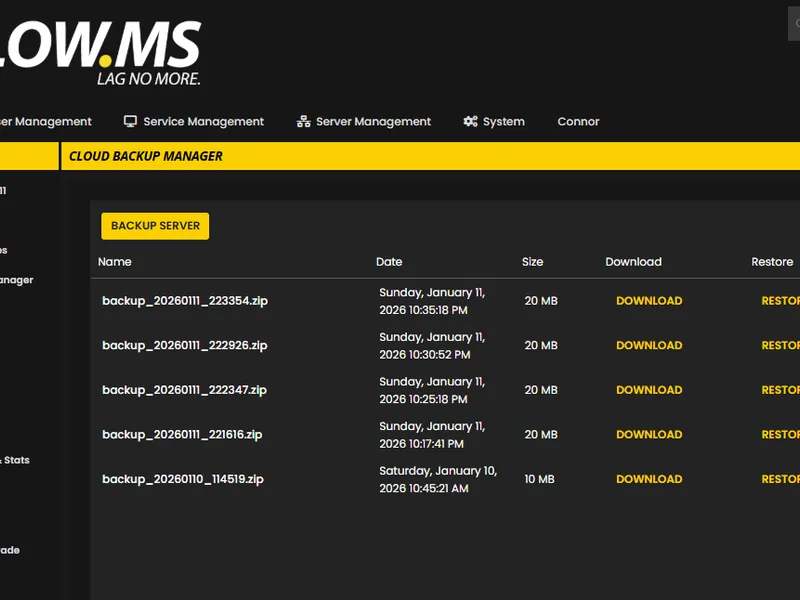
Verlieren Sie Ihre Valheim-Speicherung nie wieder mit unserem hochmodernen Cloud-Backup-System.
Ihr Valheim-Server wird mit den neuesten Intel- oder AMD-Prozessoren und NVMe-SSDs ausgestattet.
Alle unsere Rechenzentrumsnetzwerke verfügen über einen DDOS-Schutz auf Unternehmensebene, um sicherzustellen, dass Ihr Valheim-Server-Hosting nie ausfällt.
Kundenunterstützung rund um die Uhr mit einer Verfügbarkeitsgarantie von 99,9 %, um sicherzustellen, dass Ihr Valheim-Server niemals offline geht.
Volle Rückerstattung innerhalb der ersten 5 Tage, wenn Ihr Valheim-Server nicht auf dem neuesten Stand ist.
Verlieren Sie niemals wieder Ihren Valheim Fortschritt mit unserem fortschrittlichen Cloud-Backup-System. Wir erstellen automatisch regelmäßige Backups Ihres Spielservers, sodass Ihre Welt, Konfigurationen und Spielerdaten immer sicher sind.
Unser intuitiver Backup-Manager gibt Ihnen die volle Kontrolle über Ihre Server-Backups. Stellen Sie einfach einen früheren Zeitpunkt wieder her, laden Sie Backups lokal herunter oder erstellen Sie manuelle Snapshots, bevor Sie große Änderungen vornehmen.
Out of all hosting providers. This is by far the top choice in my list. Simple UI with a mod manager included making it hassle-free when downloading specific mods.
— Jose
I opened a ticket for help migrating my server from a different host. The game is Palworld and it isn't a simple process, they did it for me! Very helpful and responsive.
— Justin
Their prices are pretty cheap and I thought they'd cut back on performance but damn was I wrong. The service has been insanely reliable and the Support Team are on their own level!
— Anti
Wir unterstützen jeden öffentlichen Valheim-Steam-Branch standardmäßig, einschließlich der privaten passwortgeschützten Branches. Wechseln Sie jederzeit über Ihr Control Panel.
Previous stable

Vereinigte Staaten
Bend, OR
Los Angeles, CA
Phoenix, AZ
Dallas, TX
Miami, FL
Ashburn, VA
Europa
London, UK
Nürnberg, DE
Helsinki, FI
Warschau, PL
Asien & Ozeanien
Singapur, SG
Sydney, AU
Melbourne, AU
Wir haben dich abgedeckt!
Für Ihren Valheim-Server stehen uns zahlreiche Standorte zur Verfügung. Wenn Sie Hilfe bei der Auswahl eines Standorts benötigen, wenden Sie sich an den Support.
Alle Standorte verfügen über DDoS-Schutz, der Angriffen von bis zu 100 Gbps standhalten kann. Damit bleibt dein Spielserver sicher, egal wo auf der Welt er sich befindet.
Gibt es einen Standort, den du gerne sehen würdest? Lass es uns wissen!
Finden Sie Antworten auf häufige Fragen zum Valheim-Server-Hosting.
Valheim officially supports up to 10 players on a dedicated server. LOW.MS offers plans from 8 to 64 slots – larger slot counts are intended for communities running mods that lift Valheim's vanilla 10-player cap. The vanilla game is best experienced with 2-10 players.
Yes. Valheim supports crossplay between Steam, Xbox and PC Game Pass, and the 1.0 launch on September 9, 2026 adds PlayStation 5 and Nintendo Switch 2 to that list. Enable the crossplay option in your server settings and players connect using a Join Code printed in the server log on startup. One catch worth knowing: crossplay and BepInEx mods cannot run at the same time – if you want mods, all of your players need to be on Steam.
Absolutely. Valheim has a thriving mod scene built on BepInEx and Thunderstore, with thousands of mods available, from quality-of-life tweaks and building tools to performance optimisers and full gameplay overhauls. The easiest route is our panel's built-in Mod Manager, which installs popular BepInEx mods with one click and no manual setup. For anything outside the curated catalogue, open a support ticket and we'll get it installed for you, since for security the panel blocks customers from uploading .dll files directly. One catch worth knowing: BepInEx mods and crossplay can't run together, so if you want Xbox, PlayStation or Switch players on your world, you'll need to stay vanilla. Our [mod installation guide](/knowledgebase/valheim-mod-installation-guide) walks through the whole process.
You can connect three ways: via the Steam server browser (add your IP and port to favourites), via the in-game Join Game menu (search by name or click Add Server), or – if you have crossplay enabled – using a Join Code for cross-platform play. Your server IP and port are displayed in the LOW.MS control panel.
Yes. Copy your world's .db and .fwl files from your local saves folder ("worlds_local" inside %appdata%\..\LocalLow\IronGate\Valheim) and upload them via the LOW.MS file manager. Set the world name in your server settings to match the uploaded world, restart the server, and your existing world will load with all your progress intact.
Yes. LOW.MS provides automatic cloud backups for your Valheim world, on top of Valheim's own built-in auto-save (every 30 minutes by default) and rolling backup chain. You can restore from any backup through the control panel in a few clicks.
A vanilla Valheim server runs comfortably on 4-6 GB of RAM, but modded servers and worlds with large builds benefit from more. All LOW.MS Valheim plans include 10 GB of RAM as standard – significantly more than most competitors who include only 2-4 GB at their base tier. If you need more, you can upgrade to 15, 20, 25 or 30 GB at checkout or later from the panel.
Add your Steam64 ID to the adminlist.txt file via the LOW.MS file manager and restart the server. Once that's done, basic admin commands like kick, ban, save, noportals and lodbias work from the in-game F5 console. A heads-up: Valheim's full devcommands set (god mode, fly, spawn, etc.) is restricted to single-player by Iron Gate and does not work on a vanilla dedicated server. If you want the full cheat command set on a dedicated server, install the Server devcommands mod by Jere Kuusela from Thunderstore.
Ihr Valheim wird sofort nach der Zahlung eingerichtet, sodass Sie ohne Verzögerungen mit dem Hosting beginnen können.
Ja! Unser benutzerfreundliches Bedienfeld gibt Ihnen die volle Kontrolle über Spielmodi, Karten und Serverkonfigurationen auf Ihrem Valheim-Server.
Wir bieten rund um die Uhr Support für Ihren Valheim-Server per Live-Chat und E-Mail, um Ihnen bei Fragen oder technischen Problemen behilflich zu sein.
Absolut. Wenn Sie mit Ihrem Valheim-Server nicht zufrieden sind. Wir gewähren innerhalb der ersten 5 Tage eine vollständige Rückerstattung.
Unsere Valheim-Server verwenden erstklassige Intel- oder AMD-Hardware, um sicherzustellen, dass Ihr Server reibungslos läuft!
Ihr Server ist innerhalb weniger Minuten bereit
Enterprise-Level-Schutz inklusive
Experten-Hilfe, wann immer Sie sie brauchen
Ab
Jederzeit kündbar. Keine Mindestlaufzeit. Volle Rückerstattung innerhalb von 5 Tagen.
Valheim is a viking survival game which can be played solo, or with a group. Players work together to gather resources, build structures, and defeat enemies and bosses. The game also has a strong focus on exploration and discovery (including by boat), which makes it more enjoyable to play with others as you can share in the excitement of discovering new areas and secrets together. Many of the LOW.MS team are big fans of the game, and often re-visit the game when major updates (such as Mistlands) are released. We have been providing Valheim hosting since day one. Your game server is in no better hands. With our cloud backup system you won't lose any more save files again unlike other hosts!



Wir sind zuversichtlich, dass Sie mit unserem Service zufrieden sein werden. Wenn es in seltenen Fällen ein Problem mit Ihrem Service gibt, werden wir unser Möglichstes tun, um die Dinge für Sie zum Laufen zu bringen, oder Sie können einfach Ihr Geld zurückverlangen.
Wir haben eine volle 5-tägige Geld-zurück-Garantie auf all unser Game-Server-Hosting. Keine Fragen.
Eine Auswahl an -Hosting-Anleitungen und Artikeln, handgeschrieben von unserem Support-Team

A version bump the size of 1.0 breaks essentially every BepInEx mod until authors catch up. How to tell a broken mod from a broken server, get back online first, and reintroduce mods without guessing.

Valheim 1.0 arrives on 9 September 2026. Here's the order to do things in: back up before you touch anything, update through Steam Update, what crossplay actually changes for a dedicated server, and the five things to check when players can't connect afterwards.

A comprehensive guide to configuring your Valheim dedicated server, including world modifiers, admin commands, server launch parameters, and permission management.
A full up to date list of commands you can use whilst you're an admin.

Solutions for the most common Valheim dedicated server issues, including connection problems, performance lag, world save issues, mod conflicts, and crossplay troubleshooting.

A complete guide to setting up and connecting to your Valheim dedicated server on LOW.MS, including first-time configuration, connecting with friends, and enabling crossplay.
Unser brandneues Control-Panel wird bald für Valheim Server-Hosting verfügbar sein. Es bietet alles, was unser bestehendes Control Panel hat, jedoch mit einer völlig neuen, intuitiven und eleganten Oberfläche.
Unser hauseigenes Entwicklungsteam arbeitet seit 2021 daran, und es wird die Branche im Sturm erobern. Klicken Sie auf die Schaltfläche unten, um mehr darüber zu erfahren. Bis das neue Control Panel veröffentlicht wird, haben Sie weiterhin Zugriff auf unser funktionsreiches TCAdmin-Control-Panel.
