Windrose is still in Early Access. It only dropped on Steam in April, and the mod scene is exactly where you'd expect it to be: small, scrappy, and moving fast. There's no Steam Workshop, no in-game browser, no official modding tools from Kraken Express. But players have already figured out where the game loads .pak files from, and there's a growing pile of community mods on Nexus that are genuinely worth running.
I've been watching what our customers actually install on their LOW.MS Windrose servers, and a pattern has formed. It's not the "total conversion" end of the modding world yet. It's mostly the quality-of-life and rate-tweaking side that makes the game feel better for a crew of friends who don't want to spend two hours chopping wood before every raid. Which, honestly, is most of us.
If you want the how-to, we've got a full walkthrough on installing mods on your Windrose server. This piece is the what-to-install companion: the mods I'd actually put on a fresh server today.
Where Windrose Mods Live
Nexus Mods is the one place that matters right now. Everything's at nexusmods.com/games/windrose, and at the time of writing the list is a few dozen mods deep and growing by the week. Most of them are simple .pak drops. A handful of the more ambitious ones use UE4SS, a scripting framework that lets modders hook into the game at a deeper level.
There's no Thunderstore community for Windrose (I checked, the endpoint doesn't exist). There's no CurseForge page either. Nexus is it. Most mods need to go on both the server and every player's client to actually work, so the usual "just install on the server" shortcut that works for something like Valheim doesn't apply here. Keep that in mind as you read the list.
The Mods Worth Running
I've grouped these loosely by what they're for rather than ranking them 1-to-15, because honestly the "best" mod depends entirely on what's annoying you right now.
Quality of Life
Expanded Horizons – QOL Plus by RenDestefani is the one I'd install first on almost any server. It's a comprehensive overhaul that trims back the tedious bits: shorter processing timers, bigger backpack and chest inventories, larger resource stacks, and a generous bump to building limits. If you want exactly one mod that makes the game respect your time, this is it. Needs to be on the server and every client.
MoreStacks (IceBoxStudio) is the simpler version of the same idea. Stack sizes go up 10x, 100x, or 1000x depending on which variant you drop in. If Expanded Horizons feels like too much of a shift and you just want the inventory pain to go away, this is the cleaner pick. The author has been actively updating it through Early Access patches, which is more than I can say for a lot of mods.
There's also Max Stack Sizes – 999 to 999999 or Multipliers x2-10, x100, which does the same job with more granular options if you want to dial in a specific stack ceiling rather than a multiplier.
Rate Tweaks (Loot, XP, Progression)
Rate-multiplier mods are where Windrose modding really lives right now. A few worth knowing about:
- 2x 3x 5x 10x 100x All Loot – does what the name says. You pick a multiplier for every loot table in the game. Plain and effective.
- loot x100 by lelebeidao – a heavier-handed version of the same idea, with 100x applied to both drops and partial resource gathering. Good for private servers with short play sessions.
- More Mineral Resources – dials up respawn rates and yields on ore, stone, sulfur, clay, and salt specifically. If you don't want everything inflated, just the grindy crafting-material loop, this is more surgical.
- Fast Craft by MrG3ba – kilns and furnaces produce one item per second instead of the default timer. Worth noting: a few users have reported it messing with the journal and discoveries menu, so test it before committing it to a long-running world.
I'd pick one of these, not several. They overlap and can fight each other if you stack them.
Movement and Exploration
More Stamina adds a pick-one-multiplier bump to your stamina pool, from 2x up to 50x. On a soulslite-style game this one's a bit of a taste test. Some people feel Windrose's stamina management is core to the combat, others think it makes basic traversal tedious. For casual crews I'd push the multiplier lower (2x or 5x) rather than go wild.
On the fast-travel side, there are two useful mods doing slightly different things. More Fast-Travel Points and Signal Fires raises the caps on how many travel points and fires you can plant across the map. Fast Travel Plus by Vidguy10 does the same for fast-travel bells specifically, bumping the default 10-cap up to 20, 30, or 50 depending on the variant. Note: Fast Travel Plus is client-only. Your players install it on their end, not on your server.
If you prefer a different camera feel, First Person Camera by axbhub flips Windrose into first-person with adjustable FoV. Also client-only, so it's a personal preference thing per player rather than something you push server-wide.
Server Tools (the real heavy hitters)
This is where things get interesting for anyone actually running a server rather than just playing on one.
Windrose Mod Manager by Vercadi is the one I'd install even if you don't think you need it yet. It's a proper manager: drag-and-drop .zip and .7z support, auto-detects your game paths, backs up files before it touches them, tracks installs so uninstalls are clean, and lets you safely edit ServerDescription.json and WorldDescription.json without breaking the tagged-JSON format those files use. There's now a dedicated server build too that supports SFTP and SSH, so you can point it at your LOW.MS server directly (port 8822 for SFTP if you go that route). Code's open source on GitHub if you want to inspect it first.
There's also CertiFried Windrose Mod Manager as an alternative – same category of tool, different author, different UX. Try both if you care about the workflow.
UE4SS for Windrose is the scripting framework that anything more ambitious than a .pak drop uses. On its own it doesn't do much. It's the foundation other mods build on. If a mod's instructions say "requires UE4SS," this is what they mean.
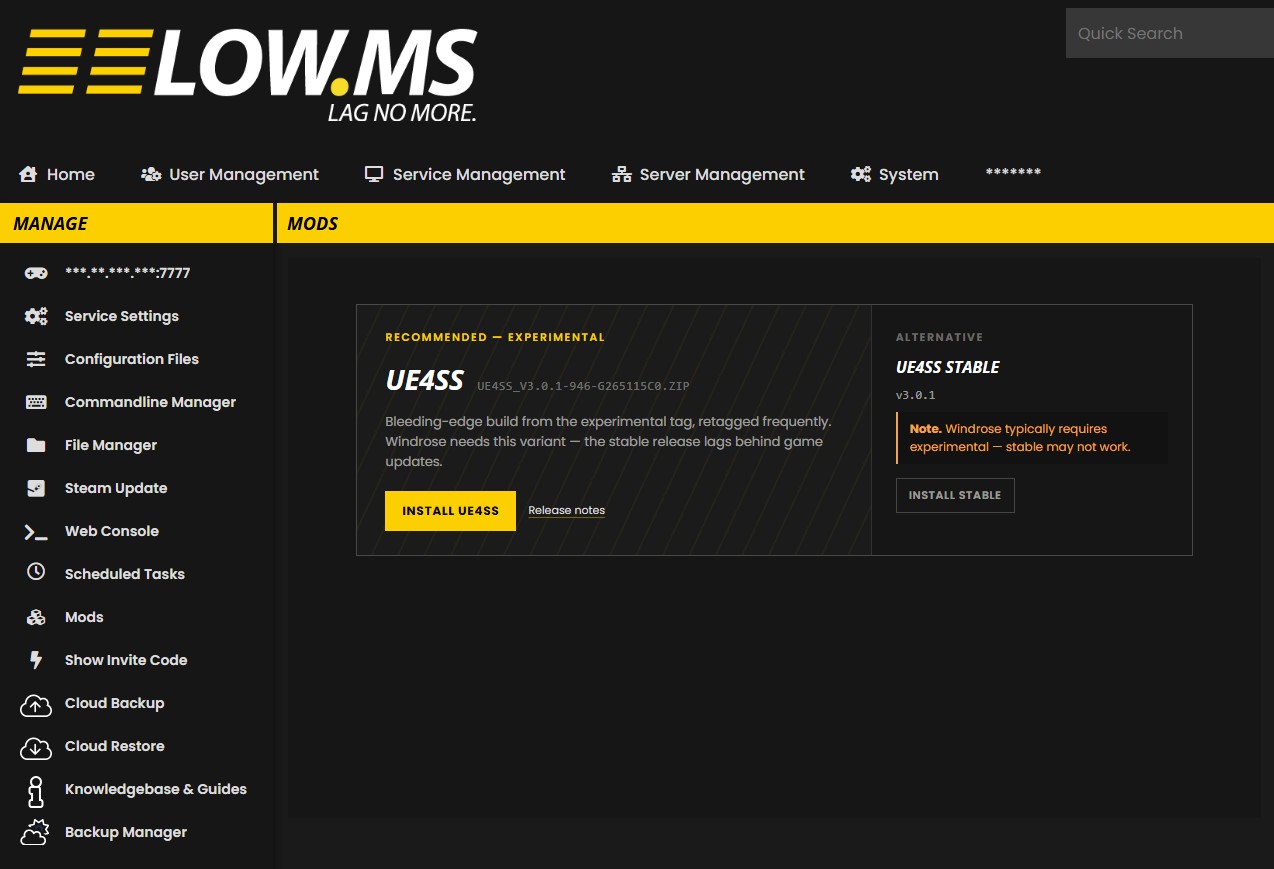
If you're hosting on LOW.MS, you don't need to grab UE4SS off Nexus and unpack it manually. It's a one-click install in the panel's Mod Manager, with both the stable and the latest-experimental build sitting side by side:
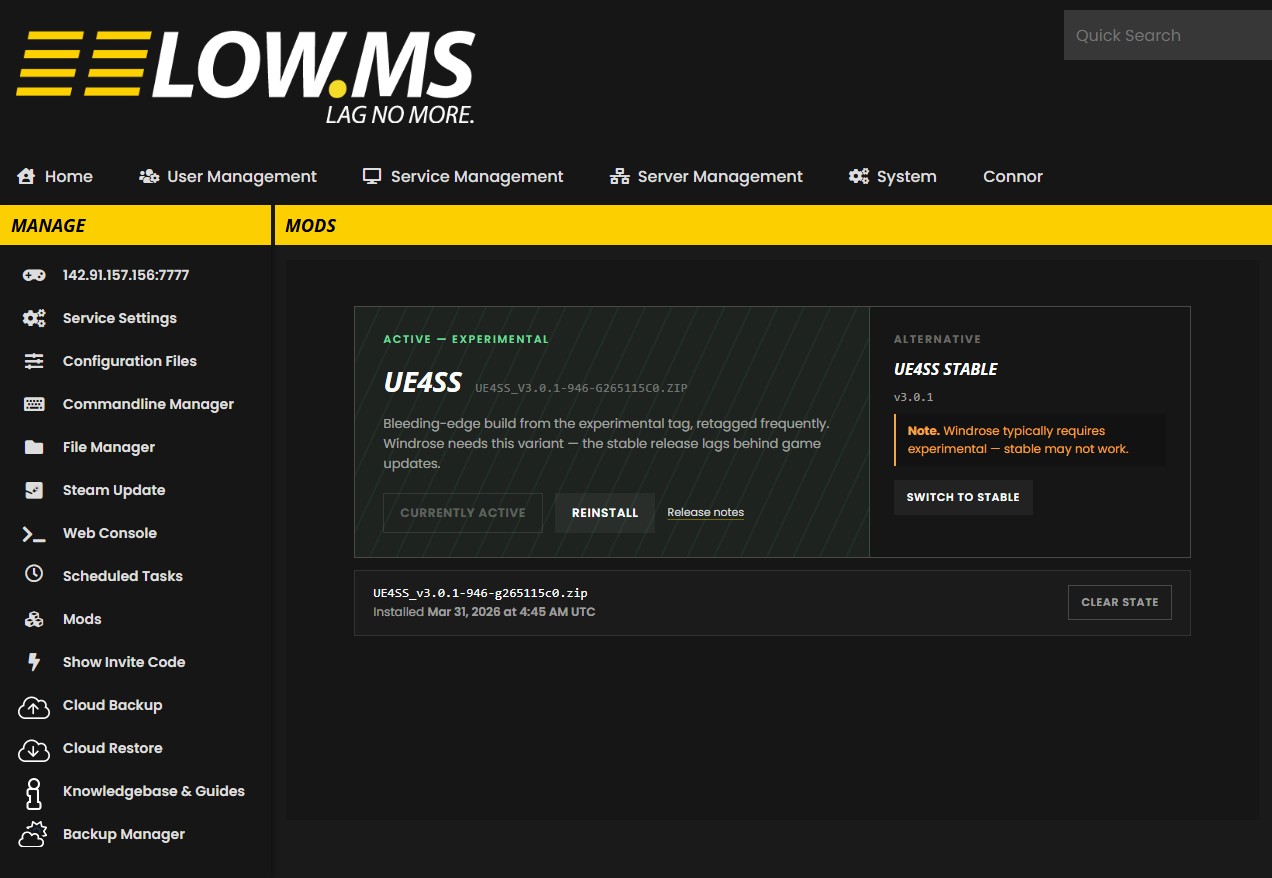
After it installs, the panel shows you exactly which build is active and the version tag it landed on, with a Switch to Stable button if you ever want to drop back to the slower-moving channel:
Windrose Server RESTAPI builds on UE4SS to add a small HTTP API to your dedicated server. It's still a work in progress and the endpoint list is short right now, but if you've ever wanted to poke at your server state from a Discord bot or a dashboard, this is where to start.
And honourable mention: WindrosePlus by humangenome, which lives on GitHub rather than Nexus. It's a server-side framework that adds a live web-based sea chart, a web admin dashboard with RCON-style commands, server query (so your server shows up in third-party browsers), and a huge set of config tweaks. If you're running a public Windrose server for a community, this is probably the single biggest force multiplier you'll find.
Visuals and Performance
Definitive Engine Tweaks by Vercadi (same author as the Mod Manager) is an Engine.ini drop that cuts stuttering, improves shader compile behaviour, and smooths out traversal without touching the game's visual look. It's client-only (players install it themselves), but it's the kind of thing you'd recommend to anyone in your crew complaining about hitches.
BetterLantern bumps lantern illumination range and fuel capacity, with an infinite-fuel variant for people who want to stop worrying about oil entirely. Small mod, does exactly one thing well.
Better Minimap Range widens the fog-of-war reveal radius and expands the minimap display. For explorers it's a quiet but significant upgrade.
World Behaviour
Living World ships two presets that retune day/night cycles, wind power, moon cycles, and AI aggression all together. It's the closest thing Windrose has to a "replay with the dial turned up" option. Works best on a fresh world rather than something you've already invested hours in, because some of the changes affect creature spawn behaviour in ways that can feel weird mid-campaign.
A Few Caveats Before You Start Clicking
Windrose mods are Early Access mods on an Early Access game. That cuts both ways:
- A patch will break mods. Not might. Will. Every time R5 pushes an update, expect a window where some of your mod list is broken until authors update. This is just the reality of the space right now.
- Most of these mods need to be installed on both the server and every single client. If one player forgets, they'll either silently desync or fail to connect. Make this clear to your crew before you enable anything.
- Back up before you install. Seriously, even a "simple" loot mod can corrupt a save if it fights another one you've got running. Our Windrose backup and restore guide has the details, but the short version: snapshot your world folder, install your mods, test, then keep snapshotting as you go.
- Test on a throwaway server first if you're about to install more than one or two mods at once. A lot of these mods touch the same parameters (loot multipliers, stack sizes, build caps) and stacking them produces weird results.
If you're on a LOW.MS Windrose plan, all the file editing happens through File Manager or Configuration Files in control.low.ms, so no SFTP needed unless you specifically want it. The mods folder path is R5/Content/Paks/~mods/ and you'll need to create the ~mods directory yourself the first time. The server mods install guide walks through it step by step.
One final thought: the Windrose mod scene is going to look wildly different in six months. What's here now is a foundation, not the ceiling. The fact that UE4SS already works and that people like humangenome are building RCON-style admin tooling on top of it means Windrose will probably end up with a genuinely deep mod ecosystem before it leaves Early Access. For now, start small, pick one or two mods that actually solve something for your crew, and add from there.