Branch
public
- Status
- Stable · Default
A survival open-world crafting sandbox where you are a resistance fighter sent back in time to stop the rise of a tyrannical empire. Collect resources, craft tech, build shelters, and fight monsters as you push your mission forward.
Below are a few reasons why LOW.MS is the ideal place to host your game server.
Begin playing on your The Front server within minutes after payment.
Never lose your The Front save again with our state of the art cloud backup system.
Your The Front server will be equipped with the latest Intel or AMD processors and NVMe SSDs.
All of our datacenter networks have enterprise-level DDOS protection to ensure your The Front server hosting never goes down.
Round-the-clock customer assistance with a 99.9% uptime guarantee to ensure your The Front server never goes offline.
Full refund within the first 5 days if your The Front server is not up to scratch.
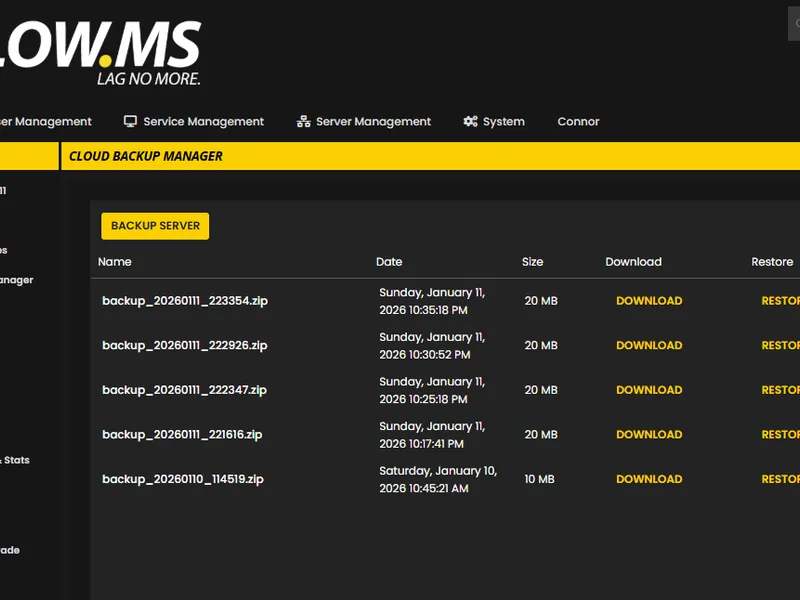
Never lose your The Front progress again with our advanced cloud backup system. We automatically create regular backups of your game server, ensuring your world, configurations, and player data are always safe.
Our intuitive Backup Manager gives you complete control over your server backups. Easily restore to any previous point, download backups locally, or create manual snapshots before making big changes.
Out of all hosting providers. This is by far the top choice in my list. Simple UI with a mod manager included making it hassle-free when downloading specific mods.
— Jose
I opened a ticket for help migrating my server from a different host. The game is Palworld and it isn't a simple process, they did it for me! Very helpful and responsive.
— Justin
Their prices are pretty cheap and I thought they'd cut back on performance but damn was I wrong. The service has been insanely reliable and the Support Team are on their own level!
— Anti
We support every public The Front Steam branch out of the box, including the private password-protected ones. Switch from your control panel any time.
Alphatest

United States
Bend, OR
Los Angeles, CA
Phoenix, AZ
Dallas, TX
Miami, FL
Ashburn, VA
Europe
London, UK
Nuremberg, DE
Helsinki, FI
Warsaw, PL
Asia & Oceania
Singapore, SG
Sydney, AU
Melbourne, AU
We've got you covered!
We have a wide variety of locations available for your The Front server. If you need help choosing a location, contact support.
All locations feature DDoS protection which can withstand attacks of up to 100 Gbps. Keeping your game server safe, no matter where in the world it may be.
Is there a location you would like to see? Let us know! Having the correct location helps your service show up correctly in the server list.
Find answers to common questions about The Front server hosting.
Your The Front is set up instantly after payment, allowing you to start hosting without delays.
Yes! Our user-friendly control panel gives you full control over game modes, maps, and server configurations over your The Front server.
We provide 24/7 support for your The Front server through live chat and email to assist you with any questions or technical issues.
Absolutely. If you're not satisfied with your The Front server. We provide a full refund within the first 5 days.
Our The Front servers use top-tier Intel or AMD hardware to ensure your server runs super smoothly!
Your server will be ready within minutes
Enterprise-grade protection included
Expert help whenever you need it
Starting from
Cancel anytime. No minimum term. Full refund within 5 days.
The Front is the kind of survival game that sounds straightforward on the box. Drop into a hostile timeline, gather resources, craft tech, build a base, push back against an empire. In practice you spend most of your time arguing with friends about whether the watchtower needs another floor and watching somebody's home-made vehicle disassemble itself on the first hill. The world is shared, persistent, and a lot more interesting once you stop hosting it from your own machine. That's why most groups end up wanting a dedicated server. The official server binary works, but Samar Studio's SteamCMD distribution ships without a few pieces from the game client, and the missing files surface as NPCs that animate but never move. We've documented the fix in our [self-host walkthrough](https://low.ms/knowledgebase/how-to-host-the-front-dedicated-server), but if you'd rather not chase DLLs across two Steam installs at midnight, our LOW.MS plans for The Front have the file fix baked in, MariaDB wired up, and the four UDP ports the game wants open at provision time. You pick a region at checkout, the server spins up in minutes, and the [LOW.MS Control Panel](https://control.low.ms) does the rest. Where we put our weight is in the things that go wrong at 2am. Cloud Backup captures the install plus the MariaDB world state in a single snapshot, so a backup is actually a rollback point rather than half of one. DDoS protection sits in front of every server. Support is 24/7 because the game patches are 24/7 and we've learned the hard way that "small Asia-region patch on a Sunday" can wipe a public server's player list before anyone European wakes up. If you want the technical detail on what we run, the [hosting guide](https://low.ms/knowledgebase/how-to-host-the-front-dedicated-server) covers it; if you just want to pick a plan and play this weekend, the order form below is shorter than reading this paragraph.

We are confident that you'll be happy with our service. If on the rare occasion there is a problem with your service, we will do our absolute best to get things working for you, or you can simply ask for your money back.
We have a full 5 day money-back guarantee on all our game server hosting. No questions asked.
A selection of hosting guides and articles, hand-written by our own support team

Setting up a dedicated server for The Front, the easy way and the SteamCMD way. Covers the four UDP ports, the missing-launcher-files trap that makes NPCs stand still, ServerConfig_.ini, admin and PvP setup, and what changes when you put it on LOW.MS.

A grouped reference for every key in The Front's ServerConfig_.ini, with the defaults that ship, what they actually do, and the handful that are worth touching versus the ones that are safer left alone.
Doable, but the gap between 'it boots' and 'your crew can actually log in' is where most home setups fall over. Here's what self-hosting The Front signs you up for, and what we handle if you'd rather skip it.
Get SteamCMD onto a Windows box and run the command below. The Front's game and dedicated server share App ID 2285150, anonymous login is fine, and no Linux build exists.
$ steamcmd +login anonymous +app_update 2285150 validate +quitFour UDP ports inbound: 7900 game, 7901 beacon (the easy one to miss), 7902 Steam query, 7903 manager shutdown. All four need firewall plus router port-forwarding.
SteamCMD ships incomplete. Copy WindowsServer\ and TheFrontManager\ from a client install into your server folder (this is what fixes the NPCs-not-moving bug), and drop the Steam DLLs into ProjectWar\Binaries\Win64\ so the server browser sees you. Then run TheFrontManager.exe to generate ServerConfig_.ini and edit name, password, cap, mode, admins.
Launch via the manager's Start button so the ?DedicatedServer token is set (the ?OfficialServer alternative silently breaks NPCs). Hand out IP:7900 and test the join from a second machine before telling anyone the server is live.
The box can't sleep, can't auto-reboot, can't lose power unnoticed. Back up both the bundled MariaDB AND the world files: either alone is useless. Re-run SteamCMD when Samar patches, then update every client to match before reconnects.
You're the support team. NPC bugs, version mismatches, ACE flags, midnight crashes, all yours. If that's not the hobby you signed up for, our LOW.MS plans for The Front ship with the file fix baked in, Cloud Backup that captures MariaDB plus world state in one snapshot, and 24/7 support.
Check out at the top of this page and we handle all six steps.
Panel access and connection details land in your inbox the moment payment clears. Share with your crew and start playing.
12 locations to choose at checkout, so ping stays low without your home upload doing the heavy lifting.
Saves snapshot in the background while you play. Browse and restore previous backups from the panel any time.
No router config, no port forwarding, no firewall fights. Network filtering sits in front of your server from the first minute.
If a patch or a mod breaks the world, roll back to a known-good snapshot from the panel. Takes seconds.
Pricing visible up front. No signup wall.
If you'd rather try it yourself first, our The Front guides above walk through the SteamCMD setup. We'll be here if you migrate later.
Our brand new control-panel will soon be available for The Front server hosting. Featuring everything our existing control panel has, but with an all new intuitive and sleek looking interface. Including a fully advanced file manager, mod installation and so on.
Our own in-house development team have been working on this since 2021, and it will take the industry by storm. Click the button below to learn more about it. Until the new control panel is released, you'll still have access to our feature-packed TCAdmin server control panel.
